
构建自定义Tag镜像应用案例
Serverless · 第 15 篇
来源课程笔记整理优化;插图已迁入博客静态目录。
构建自定义Tag镜像应用案例
使用 Results 传递数据
一、应用场景说明
前面我们在构建镜像的时候可以看到镜像的 TAG 固定的,或者需要在每次执行的时候通过参数传递进去,这样就会比较麻烦,那么有没有可以自动生成镜像 TAG方法 呢?例如:根据时间戳来生成一个构建的ID。
二、实现过程
2.1 实现思路
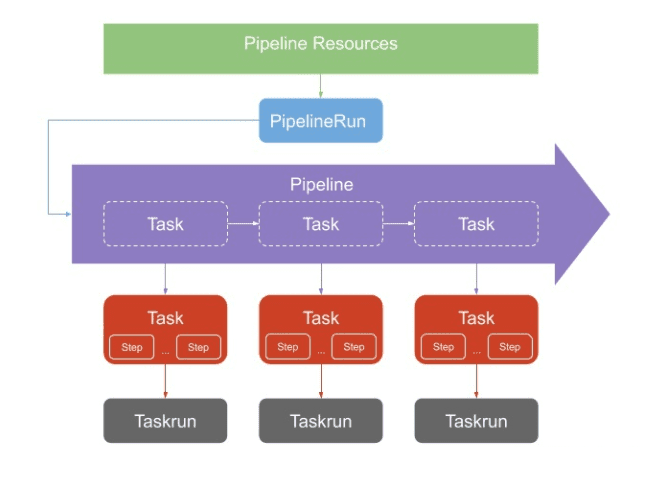
通过定义一个 Task 任务,执行 script 脚本去获取到数据后传入到 results 中去,把这些 results 中保存的数据传递到流水线中其他任务,例如可通过获取 git commit 的 SHA 值,或者生成一个随机的 ID 来作为镜像 TAG;再例如创建一个名为 generate-build-id 的 Task 任务,定义 get-timestamp 和 get-buildid 两个 Steps,一个用于生成时间戳,一个用于生成一个包含基本版本的结果值,将结果添加到 results 中去。
2.2 资源准备
准备源代码
# cat resource-demo-git.yaml
apiVersion: tekton.dev/v1alpha1
kind: PipelineResource
metadata:
  name: demo-git
  namespace: default
spec:
  params:
    - name: url
      value: 'http://192.168.10.250/root/tekton-kubemsb-demo'
    - name: revision
      value: master
  type: git
准备容器镜像项目仓库
# cat harbor-image-reg.yaml
apiVersion: tekton.dev/v1alpha1
kind: PipelineResource
metadata:
name: harbor-image
spec:
type: image
params:
- name: url
value: www.kubemsb.com/test/tekton-kubemsb-demo准备harbor基本认证密钥
# cat harbor-auth.yaml
apiVersion: v1
kind: Secret
metadata:
name: harbor-auth
annotations:
tekton.dev/docker-0: http://www.kubemsb.com
type: kubernetes.io/basic-auth
stringData:
username: 'admin'
password: '12345'ServiceAccount准备
# cat sa.yaml
apiVersion: v1
kind: ServiceAccount
metadata:
name: build-sa
secrets:
- name: harbor-auth2.3 创建生成时间戳task
# vim generate-build-id.yaml
# cat generate-build-id.yaml
apiVersion: tekton.dev/v1beta1
kind: Task
metadata:
  name: generate-build-id
spec:
  description: >-
    Given a base version, this task generates a unique build id by appending
    the base-version to the current timestamp.
  params:
    - name: base-version #在pipeline中定义的参数,覆盖默认值。
      description: Base product version
      type: string
      default: "1.0"
  results:
    - name: timestamp
      description: Current timestamp
    - name: build-id
      description: ID of the current build
  steps:
    - name: get-timestamp
      image: bash:5.0.18
      script: |
        #!/usr/bin/env bash
        ts=`date "+%Y%m%d-%H%M%S"`
        echo "Current Timestamp: ${ts}"
        echo ${ts} | tr -d "\n" | tee $(results.timestamp.path)
    - name: get-buildid
      image: bash:5.0.18
      script: |
        #!/usr/bin/env bash
        ts=`cat $(results.timestamp.path)`
        buildId=$(inputs.params.base-version)-${ts}
echo ${buildId} | tr -d "\n" | tee $(results.build-id.path) #保存生成生Tag$(results.timestamp.path)这个变量的最终结果其实就是一个文件路径/tekton/results/timestamp,
也可以通过相同的路径访问这个文件,这样就实现了结果的传递。直接创建上面的 Task:
# kubectl apply -f generate-build-id.yaml
task.tekton.dev/generate-build-id created
2.4 创建流水线任务
创建完成后,现在我们就可以在 Pipeline 中来使用这个 Task 了,用来生成构建 ID,修改 test-pipeline.yaml,增加 generate-build-id 任务:
# vim pipeline.yaml
# cat pipeline.yaml
apiVersion: tekton.dev/v1beta1
kind: Pipeline
metadata:
  name: test-pipeline
spec:
  resources:
    - name: demo-git
      type: git
    - name: harbor-image
      type: image
  params:
  - name: image-tag # 从pipelinerun接收参数,并提供给get-build-id任务使用
    type: string
  tasks:
    - name: get-build-id
      taskRef:
        name: generate-build-id
      params:
      - name: base-version #在本任务运行时使用这个参数
        value: $(params.image-tag) # 使用pipeline提供的参数
    - name: build-and-push
      taskRef:
        name: build-and-push
      resources:
        inputs:
        - name: repo
          resource: demo-git
        outputs:
        - name: builtImage
          resource: harbor-image
      params:
      - name: imageTag # 提供给build-and-push任务使用
        value: "$(tasks.get-build-id.results.build-id)" # 从get-build-id任务中获取Tag
2.5 创建容器镜像构建及上传任务
在 build-and-push 任务中通过 "$(tasks.get-build-id.results.build-id)" 获取构建的 ID,将这个 ID 作为参数传入任务中去,所以我们也需要在 build-and-push 任务中增加 build-id 这个参数:
# vim task-build-push.yaml
# cat task-build-push.yaml
apiVersion: tekton.dev/v1beta1
kind: Task
metadata:
  name: build-and-push
spec:
  resources:
    inputs:
    - name: repo
      type: git
    outputs:
    - name: builtImage
      type: image
  params:
  - name: pathToDockerfile
    type: string
    default: $(resources.inputs.repo.path)/Dockerfile
    description: The path to the dockerfile to build
  - name: pathToContext
    type: string
    default: $(resources.inputs.repo.path)
    description: the build context used by docker daemon
  - name: imageTag # 从pipeline params中获取Tag,并覆盖默认值
    type: string
    default: "v0.1.0"
    description: the docker image tag
  steps:
    - name: build-and-push
      image: docker:stable
      script: |
        #!/usr/bin/env sh
        docker login www.kubemsb.com
        docker build -t $(resources.outputs.builtImage.url):$(params.imageTag) -f $(params.pathToDockerfile) $(params.pathToContext)
        docker push $(resources.outputs.builtImage.url):$(params.imageTag)
      volumeMounts:
        - name: dockersock
          mountPath: /var/run/docker.sock
  volumes:
    - name: dockersock
      hostPath:
        path: /var/run/docker.sock
2.6 创建pipelinerun
需要将 builtImage 这个 output 资源的 url 定义中将镜像 tag 去掉,在 PipelineRun 对象中新增 image-tag 的参数:
# vim pipelinerun.yaml
# cat pipelinerun.yaml
apiVersion: tekton.dev/v1beta1
kind: PipelineRun
metadata:
  name: test-pipelinerun
spec:
  serviceAccountName: build-sa
  pipelineRef:
    name: test-pipeline
  resources:
  - name: demo-git
    resourceRef:
      name: demo-git
  - name: harbor-image
    resourceRef:
      name: harbor-image
  params:
  - name: image-tag #为pipeline提供参数
    value: "v0.2.0"
2.7 应用资源清单文件
# kubectl apply -f task-build-push.yaml
task.tekton.dev/build-and-push configured
# kubectl apply -f pipeline.yaml
pipeline.tekton.dev/test-pipeline configured# kubectl apply -f pipelinerun.yaml
pipelinerun.tekton.dev/test-pipelinerun configured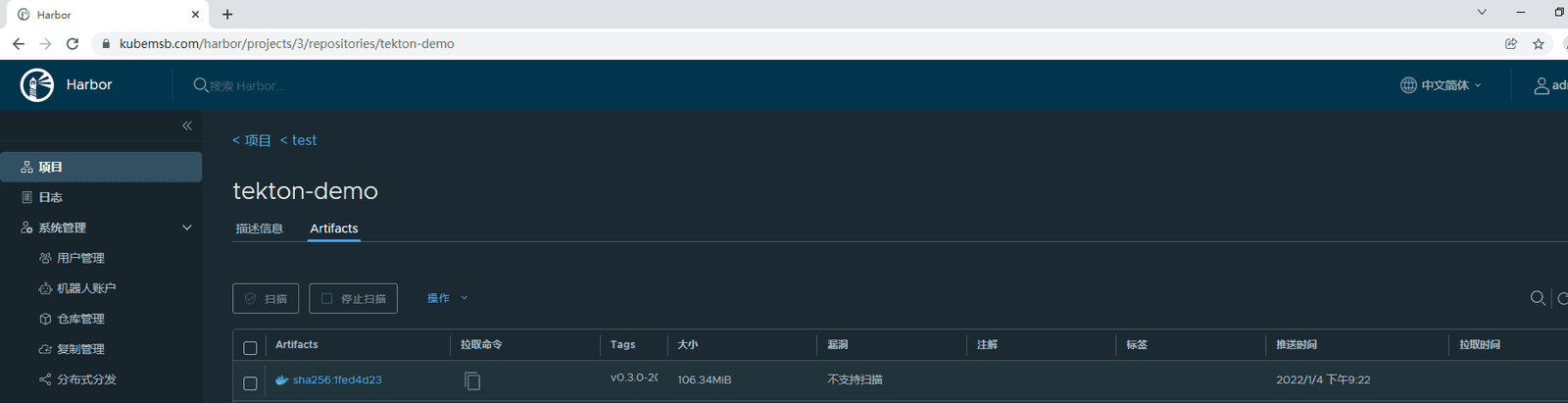
我们可以看到在 get-build-id 任务中为我们生成了 v0.3.0-20220113-157633 这样的镜像 TAG,最后也通过 results 传递到了下面的构建任务中去,镜像的 TAG 也更新了。