knative serving
2026/8/13大约 12 分钟
Serverless · 第 9 篇
来源课程笔记整理优化;插图已迁入博客静态目录。
knative serving
一、环境说明
1.1 Kubernetes集群
Master节点及Worker节点配置均为:CPU为8核,内存为8G。
查看kubernetes集群版本
[root@k8s-master01 ~]# kubectl get nodes
NAME           STATUS   ROLES                  AGE   VERSION
k8s-master01   Ready    control-plane,master   35h   v1.22.5
k8s-worker01   Ready    <none>                 34h   v1.22.5
k8s-worker02   Ready    <none>                 34h   v1.22.5
1.2 Docker版本
查看docker版本
# docker version
Client: Docker Engine - Community
 Version:           20.10.12
 API version:       1.41
 Go version:        go1.16.12
 Git commit:        e91ed57
 Built:             Mon Dec 13 11:45:41 2021
 OS/Arch:           linux/amd64
 Context:           default
 Experimental:      true

Server: Docker Engine - Community
 Engine:
  Version:          20.10.12
  API version:      1.41 (minimum version 1.12)
  Go version:       go1.16.12
  Git commit:       459d0df
  Built:            Mon Dec 13 11:44:05 2021
  OS/Arch:          linux/amd64
  Experimental:     false
 containerd:
  Version:          1.4.12
  GitCommit:        7b11cfaabd73bb80907dd23182b9347b4245eb5d
 runc:
  Version:          1.0.2
  GitCommit:        v1.0.2-0-g52b36a2
 docker-init:
  Version:          0.19.0
1.3 操作系统版本及内核版本
查看操作系统发行版本
[root@k8s-master01 ~]# cat /etc/redhat-release
CentOS Linux release 7.9.2009 (Core)
查看操作系统内核版本
[root@k8s-master01 ~]# uname -r
5.15.10-1.el7.elrepo.x86_641.4 公共服务
| 序号 | 服务 | 功能 |
|---|---|---|
| 1 | Nginx | 托管资源清单文件 |
| 2 | DNS | 提供域名解析 |
| 3 | Harbor | 提供容器镜像托管,需要证书,开放443端口 |
| 4 | MetalLB | 提供负载均衡功能 |
二、部署过程
参考网址:knative.dev
2.1 serving
资源清单文件可以直接从官方网站上下载使用,涉及到镜像问题,使用VPN解决即可。
2.1.1 添加CRD类型
使用wget下载资源清单文件
# wget https://github.com/knative/serving/releases/download/knative-v1.1.0/serving-crds.yaml
应用资源清单文件
# kubectl apply -f serving-crds.yaml查看输出结果
customresourcedefinition.apiextensions.k8s.io/certificates.networking.internal.knative.dev created
customresourcedefinition.apiextensions.k8s.io/configurations.serving.knative.dev created
customresourcedefinition.apiextensions.k8s.io/clusterdomainclaims.networking.internal.knative.dev created
customresourcedefinition.apiextensions.k8s.io/domainmappings.serving.knative.dev created
customresourcedefinition.apiextensions.k8s.io/ingresses.networking.internal.knative.dev created
customresourcedefinition.apiextensions.k8s.io/metrics.autoscaling.internal.knative.dev created
customresourcedefinition.apiextensions.k8s.io/podautoscalers.autoscaling.internal.knative.dev created
customresourcedefinition.apiextensions.k8s.io/revisions.serving.knative.dev created
customresourcedefinition.apiextensions.k8s.io/routes.serving.knative.dev created
customresourcedefinition.apiextensions.k8s.io/serverlessservices.networking.internal.knative.dev created
customresourcedefinition.apiextensions.k8s.io/services.serving.knative.dev created
customresourcedefinition.apiextensions.k8s.io/images.caching.internal.knative.dev created2.1.2 部署Serving核心服务
使用wget下载资源清单文件,如有修改需要可修改,建议直接使用。
# wget https://github.com/knative/serving/releases/download/knative-v1.1.0/serving-core.yaml
应用资源清单文件
# kubectl apply -f serving-core.yaml查看输出结果
namespace/knative-serving created
clusterrole.rbac.authorization.k8s.io/knative-serving-aggregated-addressable-resolver created
clusterrole.rbac.authorization.k8s.io/knative-serving-addressable-resolver created
clusterrole.rbac.authorization.k8s.io/knative-serving-namespaced-admin created
clusterrole.rbac.authorization.k8s.io/knative-serving-namespaced-edit created
clusterrole.rbac.authorization.k8s.io/knative-serving-namespaced-view created
clusterrole.rbac.authorization.k8s.io/knative-serving-core created
clusterrole.rbac.authorization.k8s.io/knative-serving-podspecable-binding created
serviceaccount/controller created
clusterrole.rbac.authorization.k8s.io/knative-serving-admin created
clusterrolebinding.rbac.authorization.k8s.io/knative-serving-controller-admin created
clusterrolebinding.rbac.authorization.k8s.io/knative-serving-controller-addressable-resolver created
customresourcedefinition.apiextensions.k8s.io/images.caching.internal.knative.dev unchanged
customresourcedefinition.apiextensions.k8s.io/certificates.networking.internal.knative.dev unchanged
customresourcedefinition.apiextensions.k8s.io/configurations.serving.knative.dev unchanged
customresourcedefinition.apiextensions.k8s.io/clusterdomainclaims.networking.internal.knative.dev unchanged
customresourcedefinition.apiextensions.k8s.io/domainmappings.serving.knative.dev unchanged
customresourcedefinition.apiextensions.k8s.io/ingresses.networking.internal.knative.dev unchanged
customresourcedefinition.apiextensions.k8s.io/metrics.autoscaling.internal.knative.dev unchanged
customresourcedefinition.apiextensions.k8s.io/podautoscalers.autoscaling.internal.knative.dev unchanged
customresourcedefinition.apiextensions.k8s.io/revisions.serving.knative.dev unchanged
customresourcedefinition.apiextensions.k8s.io/routes.serving.knative.dev unchanged
customresourcedefinition.apiextensions.k8s.io/serverlessservices.networking.internal.knative.dev unchanged
customresourcedefinition.apiextensions.k8s.io/services.serving.knative.dev unchanged
image.caching.internal.knative.dev/queue-proxy created
configmap/config-autoscaler created
configmap/config-defaults created
configmap/config-deployment created
configmap/config-domain created
configmap/config-features created
configmap/config-gc created
configmap/config-leader-election created
configmap/config-logging created
configmap/config-network created
configmap/config-observability created
configmap/config-tracing created
horizontalpodautoscaler.autoscaling/activator created
poddisruptionbudget.policy/activator-pdb created
deployment.apps/activator created
service/activator-service created
deployment.apps/autoscaler created
service/autoscaler created
deployment.apps/controller created
service/controller created
deployment.apps/domain-mapping created
deployment.apps/domainmapping-webhook created
service/domainmapping-webhook created
horizontalpodautoscaler.autoscaling/webhook created
poddisruptionbudget.policy/webhook-pdb created
deployment.apps/webhook created
service/webhook created
validatingwebhookconfiguration.admissionregistration.k8s.io/config.webhook.serving.knative.dev created
mutatingwebhookconfiguration.admissionregistration.k8s.io/webhook.serving.knative.dev created
mutatingwebhookconfiguration.admissionregistration.k8s.io/webhook.domainmapping.serving.knative.dev created
secret/domainmapping-webhook-certs created
validatingwebhookconfiguration.admissionregistration.k8s.io/validation.webhook.domainmapping.serving.knative.dev created
validatingwebhookconfiguration.admissionregistration.k8s.io/validation.webhook.serving.knative.dev created
secret/webhook-certs created2.1.3 验证Serving是否安装成功
2.1.3.1查看命名空间
查看对应的namespace是否创建
# kubectl get ns
输出结果
NAME STATUS AGE
default Active 34h
ingress-nginx Active 27h
knative-serving Active 41s
kube-node-lease Active 34h
kube-public Active 34h
kube-system Active 34h
kubernetes-dashboard Active 29h
metallb-system Active 99m2.1.3.2 查看命名空间下所有资源对象创建情况
# kubectl get all -n knative-serving输出结果
NAME READY STATUS RESTARTS AGE
pod/activator-57b466c6bd-k2cnc 1/1 Running 0 54s
pod/autoscaler-78475785dd-d4hxz 1/1 Running 0 54s
pod/controller-7478677c4c-hx2t6 1/1 Running 0 54s
pod/domain-mapping-5f75c74cd9-bsl82 1/1 Running 0 54s
pod/domainmapping-webhook-84587c4b68-lbwwd 1/1 Running 0 54s
pod/webhook-c7986985c-m26v5 1/1 Running 0 53s
NAME TYPE CLUSTER-IP EXTERNAL-IP PORT(S) AGE
service/activator-service ClusterIP 10.101.180.104 <none> 9090/TCP,8008/TCP,80/TCP,81/TCP 54s
service/autoscaler ClusterIP 10.107.210.10 <none> 9090/TCP,8008/TCP,8080/TCP 54s
service/autoscaler-bucket-00-of-01 ClusterIP 10.98.159.126 <none> 8080/TCP 52s
service/controller ClusterIP 10.103.198.96 <none> 9090/TCP,8008/TCP 54s
service/domainmapping-webhook ClusterIP 10.107.211.218 <none> 9090/TCP,8008/TCP,443/TCP 53s
service/webhook ClusterIP 10.110.248.39 <none> 9090/TCP,8008/TCP,443/TCP 53s
NAME READY UP-TO-DATE AVAILABLE AGE
deployment.apps/activator 1/1 1 1 54s
deployment.apps/autoscaler 1/1 1 1 54s
deployment.apps/controller 1/1 1 1 54s
deployment.apps/domain-mapping 1/1 1 1 54s
deployment.apps/domainmapping-webhook 1/1 1 1 54s
deployment.apps/webhook 1/1 1 1 53s
NAME DESIRED CURRENT READY AGE
replicaset.apps/activator-57b466c6bd 1 1 1 54s
replicaset.apps/autoscaler-78475785dd 1 1 1 54s
replicaset.apps/controller-7478677c4c 1 1 1 54s
replicaset.apps/domain-mapping-5f75c74cd9 1 1 1 54s
replicaset.apps/domainmapping-webhook-84587c4b68 1 1 1 54s
replicaset.apps/webhook-c7986985c 1 1 1 53s
NAME REFERENCE TARGETS MINPODS MAXPODS REPLICAS AGE
horizontalpodautoscaler.autoscaling/activator Deployment/activator <unknown>/100% 1 20 1 54s
horizontalpodautoscaler.autoscaling/webhook Deployment/webhook <unknown>/100% 1 5 1 53s查看pod是否运行,主要检查容器镜像是否下载成功
# kubectl get pod -n knative-serving输出结果
NAME READY STATUS RESTARTS AGE
activator-57b466c6bd-k2cnc 1/1 Running 0 112s
autoscaler-78475785dd-d4hxz 1/1 Running 0 112s
controller-7478677c4c-hx2t6 1/1 Running 0 112s
domain-mapping-5f75c74cd9-bsl82 1/1 Running 0 112s
domainmapping-webhook-84587c4b68-lbwwd 1/1 Running 0 112s
webhook-c7986985c-m26v5 1/1 Running 0 111s2.2 istio 服务网格选择
注意:此处并不是安装istio,仅为定义istio安装类型及资源对象的创建
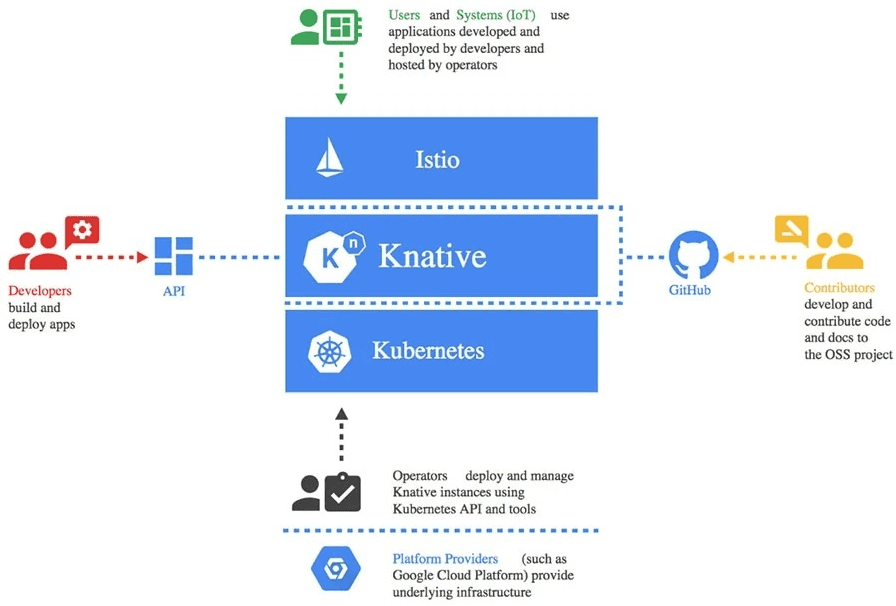
- Developers
Serverless 服务的开发人员可以直接使用原生的 Kubernetes API 基于 Knative 部署 Serverless - Contributors
主要是指社区的贡献者 - Operators
Knative 可以被集成到任何支持的环境中,比如:云厂商、或者企业内部。目前 Knative 是基于 Kubernetes 来实现的,有 Kubernetes 的地方就可以部署 Knative - Users
终端用户通过 Istio 网关访问服务,或者通过事件系统触发 Knative 中的 Serverless 服务
2.2.1 定义istio类型(CRD)
使用wget下载资源清单文件
# wget https://github.com/knative/net-istio/releases/download/knative-v1.1.0/istio.yaml
应用资源清单文件,确定使用何种方式部署istio
# kubectl apply -l knative.dev/crd-install=true -f istio.yaml输出结果
customresourcedefinition.apiextensions.k8s.io/authorizationpolicies.security.istio.io created
customresourcedefinition.apiextensions.k8s.io/destinationrules.networking.istio.io created
customresourcedefinition.apiextensions.k8s.io/envoyfilters.networking.istio.io created
customresourcedefinition.apiextensions.k8s.io/gateways.networking.istio.io created
customresourcedefinition.apiextensions.k8s.io/istiooperators.install.istio.io created
customresourcedefinition.apiextensions.k8s.io/peerauthentications.security.istio.io created
customresourcedefinition.apiextensions.k8s.io/requestauthentications.security.istio.io created
customresourcedefinition.apiextensions.k8s.io/serviceentries.networking.istio.io created
customresourcedefinition.apiextensions.k8s.io/sidecars.networking.istio.io created
customresourcedefinition.apiextensions.k8s.io/telemetries.telemetry.istio.io created
customresourcedefinition.apiextensions.k8s.io/virtualservices.networking.istio.io created
customresourcedefinition.apiextensions.k8s.io/wasmplugins.extensions.istio.io created
customresourcedefinition.apiextensions.k8s.io/workloadentries.networking.istio.io created
customresourcedefinition.apiextensions.k8s.io/workloadgroups.networking.istio.io created
unable to recognize "istio.yaml": no matches for kind "EnvoyFilter" in version "networking.istio.io/v1alpha3"
unable to recognize "istio.yaml": no matches for kind "EnvoyFilter" in version "networking.istio.io/v1alpha3"
unable to recognize "istio.yaml": no matches for kind "EnvoyFilter" in version "networking.istio.io/v1alpha3"
unable to recognize "istio.yaml": no matches for kind "EnvoyFilter" in version "networking.istio.io/v1alpha3"
unable to recognize "istio.yaml": no matches for kind "EnvoyFilter" in version "networking.istio.io/v1alpha3"
unable to recognize "istio.yaml": no matches for kind "EnvoyFilter" in version "networking.istio.io/v1alpha3"应用资源清单文件,创建istio在kubernetes集群中的资源对象
# kubectl apply -f istio.yaml输出结果
namespace/istio-system created
serviceaccount/istio-ingressgateway-service-account created
serviceaccount/istio-reader-service-account created
serviceaccount/istiod created
serviceaccount/istiod-service-account created
clusterrole.rbac.authorization.k8s.io/istio-reader-clusterrole-istio-system created
clusterrole.rbac.authorization.k8s.io/istio-reader-istio-system created
clusterrole.rbac.authorization.k8s.io/istiod-clusterrole-istio-system created
clusterrole.rbac.authorization.k8s.io/istiod-gateway-controller-istio-system created
clusterrole.rbac.authorization.k8s.io/istiod-istio-system created
clusterrolebinding.rbac.authorization.k8s.io/istio-reader-clusterrole-istio-system created
clusterrolebinding.rbac.authorization.k8s.io/istio-reader-istio-system created
clusterrolebinding.rbac.authorization.k8s.io/istiod-clusterrole-istio-system created
clusterrolebinding.rbac.authorization.k8s.io/istiod-gateway-controller-istio-system created
clusterrolebinding.rbac.authorization.k8s.io/istiod-istio-system created
role.rbac.authorization.k8s.io/istio-ingressgateway-sds created
role.rbac.authorization.k8s.io/istiod created
role.rbac.authorization.k8s.io/istiod-istio-system created
rolebinding.rbac.authorization.k8s.io/istio-ingressgateway-sds created
rolebinding.rbac.authorization.k8s.io/istiod created
rolebinding.rbac.authorization.k8s.io/istiod-istio-system created
customresourcedefinition.apiextensions.k8s.io/authorizationpolicies.security.istio.io unchanged
customresourcedefinition.apiextensions.k8s.io/destinationrules.networking.istio.io unchanged
customresourcedefinition.apiextensions.k8s.io/envoyfilters.networking.istio.io unchanged
customresourcedefinition.apiextensions.k8s.io/gateways.networking.istio.io unchanged
customresourcedefinition.apiextensions.k8s.io/istiooperators.install.istio.io unchanged
customresourcedefinition.apiextensions.k8s.io/peerauthentications.security.istio.io unchanged
customresourcedefinition.apiextensions.k8s.io/requestauthentications.security.istio.io unchanged
customresourcedefinition.apiextensions.k8s.io/serviceentries.networking.istio.io unchanged
customresourcedefinition.apiextensions.k8s.io/sidecars.networking.istio.io unchanged
customresourcedefinition.apiextensions.k8s.io/telemetries.telemetry.istio.io unchanged
customresourcedefinition.apiextensions.k8s.io/virtualservices.networking.istio.io unchanged
customresourcedefinition.apiextensions.k8s.io/wasmplugins.extensions.istio.io unchanged
customresourcedefinition.apiextensions.k8s.io/workloadentries.networking.istio.io unchanged
customresourcedefinition.apiextensions.k8s.io/workloadgroups.networking.istio.io unchanged
configmap/istio created
configmap/istio-sidecar-injector created
deployment.apps/istio-ingressgateway created
deployment.apps/istiod created
service/istio-ingressgateway created
service/istiod created
Warning: autoscaling/v2beta1 HorizontalPodAutoscaler is deprecated in v1.22+, unavailable in v1.25+; use autoscaling/v2beta2 HorizontalPodAutoscaler
horizontalpodautoscaler.autoscaling/istiod created
Warning: policy/v1beta1 PodDisruptionBudget is deprecated in v1.21+, unavailable in v1.25+; use policy/v1 PodDisruptionBudget
poddisruptionbudget.policy/istio-ingressgateway created
poddisruptionbudget.policy/istiod created
mutatingwebhookconfiguration.admissionregistration.k8s.io/istio-sidecar-injector created
validatingwebhookconfiguration.admissionregistration.k8s.io/istio-validator-istio-system created
envoyfilter.networking.istio.io/stats-filter-1.10 created
envoyfilter.networking.istio.io/stats-filter-1.11 created
envoyfilter.networking.istio.io/stats-filter-1.12 created
envoyfilter.networking.istio.io/tcp-stats-filter-1.10 created
envoyfilter.networking.istio.io/tcp-stats-filter-1.11 created
envoyfilter.networking.istio.io/tcp-stats-filter-1.12 created2.2.2 安装knative istio控制器
下载knative istio控制器资源清单文件
# wget https://github.com/knative/net-istio/releases/download/knative-v1.1.0/net-istio.yaml
应用knative istio控制器资源清单文件
# kubectl apply -f net-istio.yaml输出结果
clusterrole.rbac.authorization.k8s.io/knative-serving-istio created
gateway.networking.istio.io/knative-ingress-gateway created
gateway.networking.istio.io/knative-local-gateway created
service/knative-local-gateway created
configmap/config-istio created
peerauthentication.security.istio.io/webhook created
peerauthentication.security.istio.io/domainmapping-webhook created
peerauthentication.security.istio.io/net-istio-webhook created
deployment.apps/net-istio-controller created
deployment.apps/net-istio-webhook created
secret/net-istio-webhook-certs created
service/net-istio-webhook created
mutatingwebhookconfiguration.admissionregistration.k8s.io/webhook.istio.networking.internal.knative.dev created
validatingwebhookconfiguration.admissionregistration.k8s.io/config.webhook.istio.networking.internal.knative.dev created2.2.3 验证istio ingressgateway是否可用
查看在istio-system命名空间中创建的istio-ingressgateway资源对象
# kubectl get svc istio-ingressgateway -n istio-system查看输出结果,重点注意:EXTERNAL-IP,如果没有IP地址,表明负载均衡器(metallb)没有工作。
NAME TYPE CLUSTER-IP EXTERNAL-IP PORT(S) AGE
istio-ingressgateway LoadBalancer 10.108.136.72 192.168.10.200 15021:30384/TCP,80:30504/TCP,443:31907/TCP 2m3s2.3 域名准备
2.3.1 通过打补丁把域名添加到configmap中
# kubectl patch configmap/config-domain \
--namespace knative-serving \
--type merge \
--patch '{"data":{"knative.kubemsb.com":""}}'
2.3.2 使用本地永久性DNS配置
需要有本地DNS服务做支撑,如下:
注册域名
[root@dnsserver ~]# cat /etc/named.rfc1912.zones
......
zone "kubemsb.com" IN {
        type master;
        file "kubemsb.com.zone";
        allow-update { none; };
};
添加域名正向解析文件
[root@dnsserver ~]# cat /var/named/kbuemsb.com.zone
$TTL 1D
@ IN SOA @ admin.kubemsb.com. (
0 ; serial
1D ; refresh
1H ; retry
1W ; expire
3H ) ; minimum
NS @
@ A 192.168.122.254
*.knative A 192.168.10.200通过编辑查看configmap中是否添加上述域名
# kubectl edit configmap/config-domain -n knative-serving # the label app=secret only exposed to the local cluster.
svc.cluster.local: |
selector:
app: secret
增加了如下内容:
knative.kubemsb.com: ""2.3.3 添加HPA实现自动缩放服务(可选)
Knative 还支持使用 Kubernetes Horizontal Pod Autoscaler (HPA) 来驱动自动缩放决策。
使用wget下载资源清单文件
#wget  https://github.com/knative/serving/releases/download/knative-v1.1.0/serving-hpa.yaml
应用资源清单文件
# kubectl apply -f serving-hpa.yaml输入结果
deployment.apps/autoscaler-hpa created
service/autoscaler-hpa created2.4 istio安装
2.4.1 获取
查看已下载的istio二进制包
# ls
istio-1.12.0  istio-1.12.0-linux-amd64.tar.gz
2.4.2 定义变量
在当前终端中定义环境变量,如条件允许建议把环境变量定义至/etc/profile中,以实现永久生效。
# export ISTIOPATH=/root/istio/istio-1.12.0
# export PATH=$ISTIOPATH/bin:$PATH
# echo $PATH
/root/istio/istio-1.12.0/bin:/usr/local/sbin:/usr/local/bin:/usr/sbin:/usr/bin:/root/bin
2.4.3 查看版本
使用istioctl客户端命令查看版本
# istioctl version
client version: 1.12.0
control plane version: 1.12.0
data plane version: 1.12.0 (3 proxies)
旧版本一定要删除,删除方法如下:
如存在旧版本,一定要使用下面的命令删除,永久删除。
# istioctl x uninstall --purge
2.4.4 安装
使用istioctl命令安装istio,profile为demo
# istioctl install --set profile=demo -y
✔ Istio core installed
✔ Istiod installed
✔ Ingress gateways installed
✔ Egress gateways installed
✔ Installation complete                                                                                                               Making this installation the default for injection and validation.

Thank you for installing Istio 1.12.  Please take a few minutes to tell us about your install/upgrade experience!  https://forms.gle/FegQbc9UvePd4Z9z7
2.4.5 开启注入功能
允许knative-serving命名空间中工作负载实现自动注入机制
# kubectl label namespace knative-serving istio-injection=enabled
namespace/knative-serving labeled
三、项目开发及部署
3.1 项目开发
需要提前准备idea集成开发工具,并创建spring boot项目。
3.1.1 在idea中开发项目
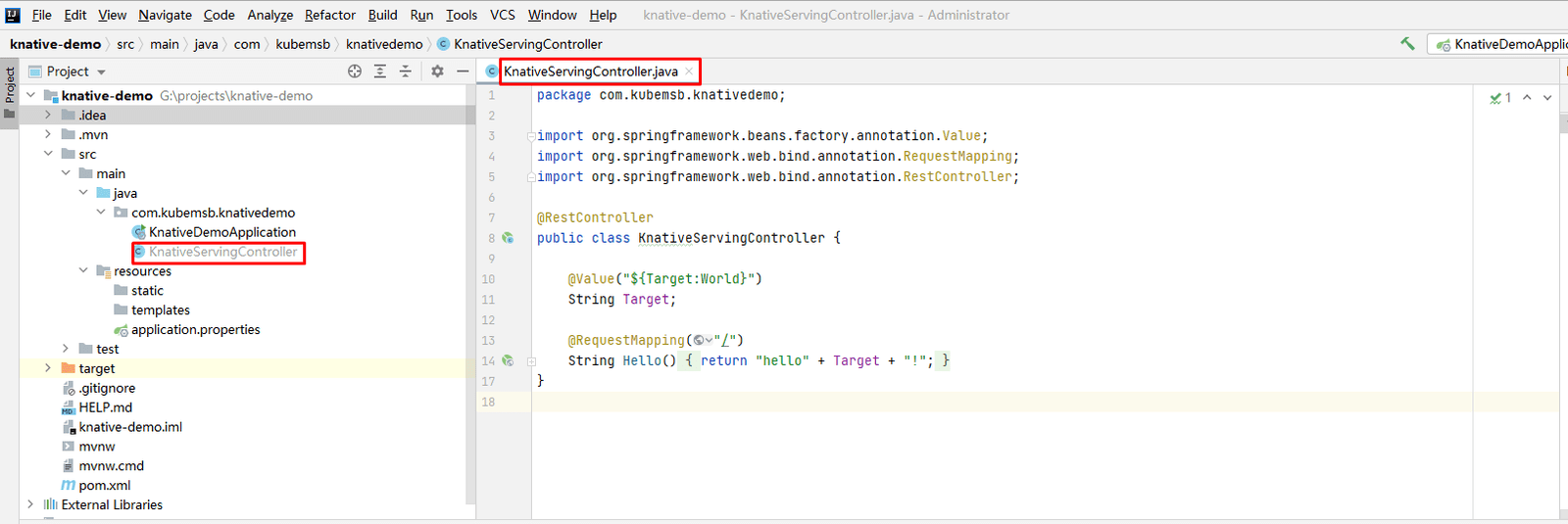
下面的路径为Windows项目路径
# G:\projects\knative-demo\src\main\java\com\kubemsb\knativedemo\KnativeServingController.java

package com.kubemsb.knativedemo;

import org.springframework.beans.factory.annotation.Value;
import org.springframework.web.bind.annotation.RequestMapping;
import org.springframework.web.bind.annotation.RestController;

@RestController
public class KnativeServingController {

    @Value("${Target:World}")
    String Target;

    @RequestMapping("/")
    String Hello() {
        return "hello" + Target + "!";
    }
}
3.1.2 在idea中运行项目并访问
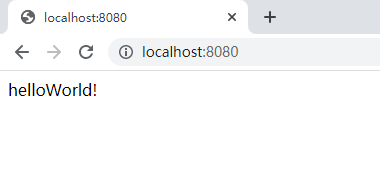
3.1.3 把在windows创建的项目迁移至Linux平台Harbor服务器
查看项目目录
[root@harbor ~]# ls
knative-demo
在项目目录中创建Dockerfile文件
[root@harbor knative-demo]# pwd
/root/knative-demo
[root@harbor knative-demo]# vim Dockerfile
[root@harbor knative-demo]# cat Dockerfile
# Use the official maven/Java 8 image to create a build artifact: https://hub.docker.com/_/maven
FROM maven:3.5-jdk-8-alpine as builder
# Copy local code to the container image.
WORKDIR /root/knative-demo
COPY pom.xml .
COPY src ./src
# Build a release artifact.
RUN mvn package -DskipTests
# Use the Official OpenJDK image for a lean production stage of our multi-stage build.
# https://hub.docker.com/_/openjdk
# https://docs.docker.com/develop/develop-images/multistage-build/#use-multi-stage-builds
FROM openjdk:8-jre-alpine
# Copy the jar to the production image from the builder stage.
COPY --from=builder /root/knative-demo/target/knative-demo-*.jar /helloworld.jar
# Run the web service on container startup.
CMD ["java", "-Djava.security.egd=file:/dev/./urandom", "-jar", "/helloworld.jar"]使用docker build制作容器镜像
# docker build -t www.kubemsb.com/test/helloworld-java:latest .使用docker push上传容器镜像至harbor仓库
# docker push www.kubemsb.com/test/helloworld-java:latest3.2 项目部署
通过Knative部署Servie资源对象,此处为编写资源清单文件
# cat server-java.yaml
apiVersion: serving.knative.dev/v1
kind: Service
metadata:
  name: helloworld-java-spring
  namespace: default
spec:
  template:
    spec:
      containers:
      - image: www.kubemsb.com/test/helloworld-java:latest
        imagePullPolicy: IfNotPresent
        env:
        - name: TARGET
          value: "World"
应用资源清单文件
# kubectl apply -f service-java.yaml
service.serving.knative.dev/helloworld-java-spring created查看创建的ksvc资源对象
# kubectl get ksvc helloworld-java-spring
NAME URL LATESTCREATED LATESTREADY READY REASON
helloworld-java-spring http://helloworld-java-spring.default.knative.kubemsb.com helloworld-java-spring-00001 helloworld-java-spring-00001 True查看revision(修订版)
# kubectl get revision
NAME CONFIG NAME K8S SERVICE NAME GENERATION READY REASON ACTUAL REPLICAS DESIRED REPLICAS
helloworld-java-spring-00001 helloworld-java-spring 1 True 0 0在当前主机或公共服务主机上测试KSVC中的URL是否可以正常解析
# nslookup
> server 查看DNS服务
Default server: 192.168.122.254
Address: 192.168.122.254#53
Default server: 119.29.29.29
Address: 119.29.29.29#53
> abc.knative.kubemsb.com 输入测试域名
Server: 192.168.122.254
Address: 192.168.122.254#53
Name: abc.knative.kubemsb.com
Address: 192.168.10.200
> helloworld-java-spring.default.knative.kubemsb.com
Server: 192.168.122.254
Address: 192.168.122.254#53
Name: helloworld-java-spring.default.knative.kubemsb.com
Address: 192.168.10.200
> exit查看路由是否创建
[root@k8s-master01 ~]# kubectl get route
NAME URL READY REASON
helloworld-java-spring http://helloworld-java-spring.default.knative.kubemsb.com True四、访问验证
在当前主机或公共服务主机,甚至宿主机使用浏览器访问以下域名,查看结果。
# curl http://helloworld-java-spring.default.knative.kubemsb.com
Hello World!
查看KSVC对应的Pod,此Pod长时间不访问,则会消失,再次访问将以冷启动的方式启动。
# kubectl get pods
NAME READY STATUS RESTARTS AGE
helloworld-java-spring-00001-deployment-6c7f89c768-vvr89 2/2 Running 0 12s访问时存在,不访问时,自动为0。
五、滚动更新及AB测试(go语言环境)
本次使用go语言运行环境
5.1 准备资料清单文件
准备v1版本资源清单文件
# cat go-example-1.yaml
apiVersion: serving.knative.dev/v1
kind: Service
metadata:
  name: helloworld-go
  namespace: default
spec:
  template:
    metadata:
      name: helloworld-go-1
    spec:
      containers:
      - image: gcr.io/knative-samples/helloworld-go
        env:
        - name: TARGET
          value: GO Sample v1
准备v2版本资源清单文件
# cat go-example-2.yaml
apiVersion: serving.knative.dev/v1
kind: Service
metadata:
name: helloworld-go
namespace: default
spec:
template:
metadata:
name: helloworld-go-2
spec:
containers:
- image: gcr.io/knative-samples/helloworld-go
env:
- name: TARGET
value: GO Sample v2准备流量分发资源清单文件
# cat go-example-3.yaml
apiVersion: serving.knative.dev/v1
kind: Service
metadata:
name: helloworld-go
namespace: default
spec:
template:
metadata:
name: helloworld-go-3
spec:
containers:
- image: gcr.io/knative-samples/helloworld-go
env:
- name: TARGET
value: GO Sample v2
traffic:
- tag: test1
revisionName: helloworld-go-1
percent: 50
- tag: test2
revisionName: helloworld-go-2
percent: 505.2 应用资源清单文件及验证
5.2.1 部署v1版本
# kubectl apply -f go-example-1.yaml
service.serving.knative.dev/helloworld-go created
# kubectl get ksvc
NAME URL LATESTCREATED LATESTREADY READY REASON
helloworld-go http://helloworld-go.default.knative.kubemsb.com helloworld-go-1 helloworld-go-1 True# kubectl get revision
NAME CONFIG NAME K8S SERVICE NAME GENERATION READY REASON ACTUAL REPLICAS DESIRED REPLICAS
helloworld-go-1 helloworld-go 1 True 0 0# kubectl get route
NAME URL READY REASON
helloworld-go http://helloworld-go.default.knative.kubemsb.com True# kubectl get configuration
NAME LATESTCREATED LATESTREADY READY REASON
helloworld-go helloworld-go-1 helloworld-go-1 True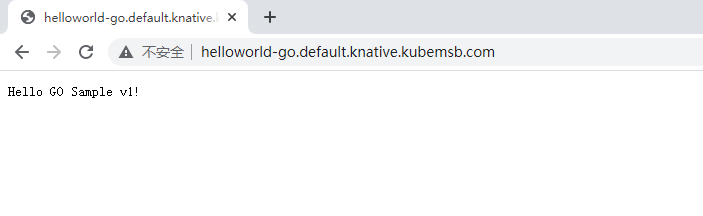
5.2.2 部署v2版本
不要删除v1版本部署
# kubectl apply -f go-example-2.yaml
service.serving.knative.dev/helloworld-go configured
# kubectl get ksvc
NAME URL LATESTCREATED LATESTREADY READY REASON
helloworld-go http://helloworld-go.default.knative.kubemsb.com helloworld-go-2 helloworld-go-2 True# kubectl get revision
NAME CONFIG NAME K8S SERVICE NAME GENERATION READY REASON ACTUAL REPLICAS DESIRED REPLICAS
helloworld-go-1 helloworld-go 1 True 0 0
helloworld-go-2 helloworld-go 2 True 0 0# kubectl get configuration
NAME LATESTCREATED LATESTREADY READY REASON
helloworld-go helloworld-go-2 helloworld-go-2 True# kubectl get pods
NAME READY STATUS RESTARTS AGE
helloworld-go-2-deployment-6dbf4f6b5f-w9g7x 2/2 Running 0 4s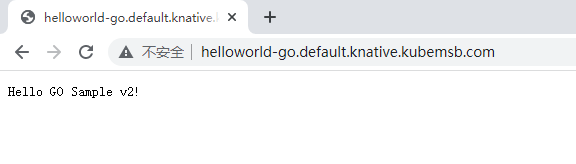
5.2.3 部署v1与v2版本并实现流量分发
# kubectl apply -f go-example-3.yaml
service.serving.knative.dev/helloworld-go configured
# kubectl get ksvc
NAME URL LATESTCREATED LATESTREADY READY REASON
helloworld-go http://helloworld-go.default.knative.kubemsb.com helloworld-go-3 helloworld-go-3 True# kubectl get revision
NAME CONFIG NAME K8S SERVICE NAME GENERATION READY REASON ACTUAL REPLICAS DESIRED REPLICAS
helloworld-go-1 helloworld-go 1 True 0 0
helloworld-go-2 helloworld-go 2 True 0 0
helloworld-go-3 helloworld-go 3 True 0 0# kubectl get pods
NAME READY STATUS RESTARTS AGE
helloworld-go-1-deployment-8444c7755f-jcrdj 2/2 Running 0 45s
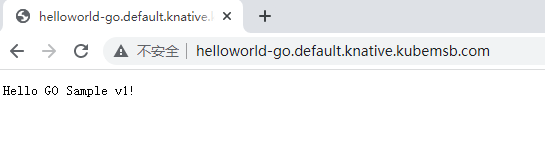
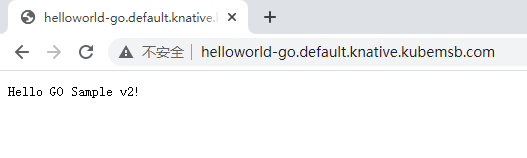
helloworld-go-2-deployment-6dbf4f6b5f-r7hz7 2/2 Running 0 40s访问网页会交替出现