
云原生边缘计算 kubeedge 部署
边缘计算 · 第 2 篇
来源课程笔记整理优化;插图已迁入博客静态目录。
云原生边缘计算 kubeedge 部署
一、k8s集群部署及基础服务提供
1.1 k8s集群部署
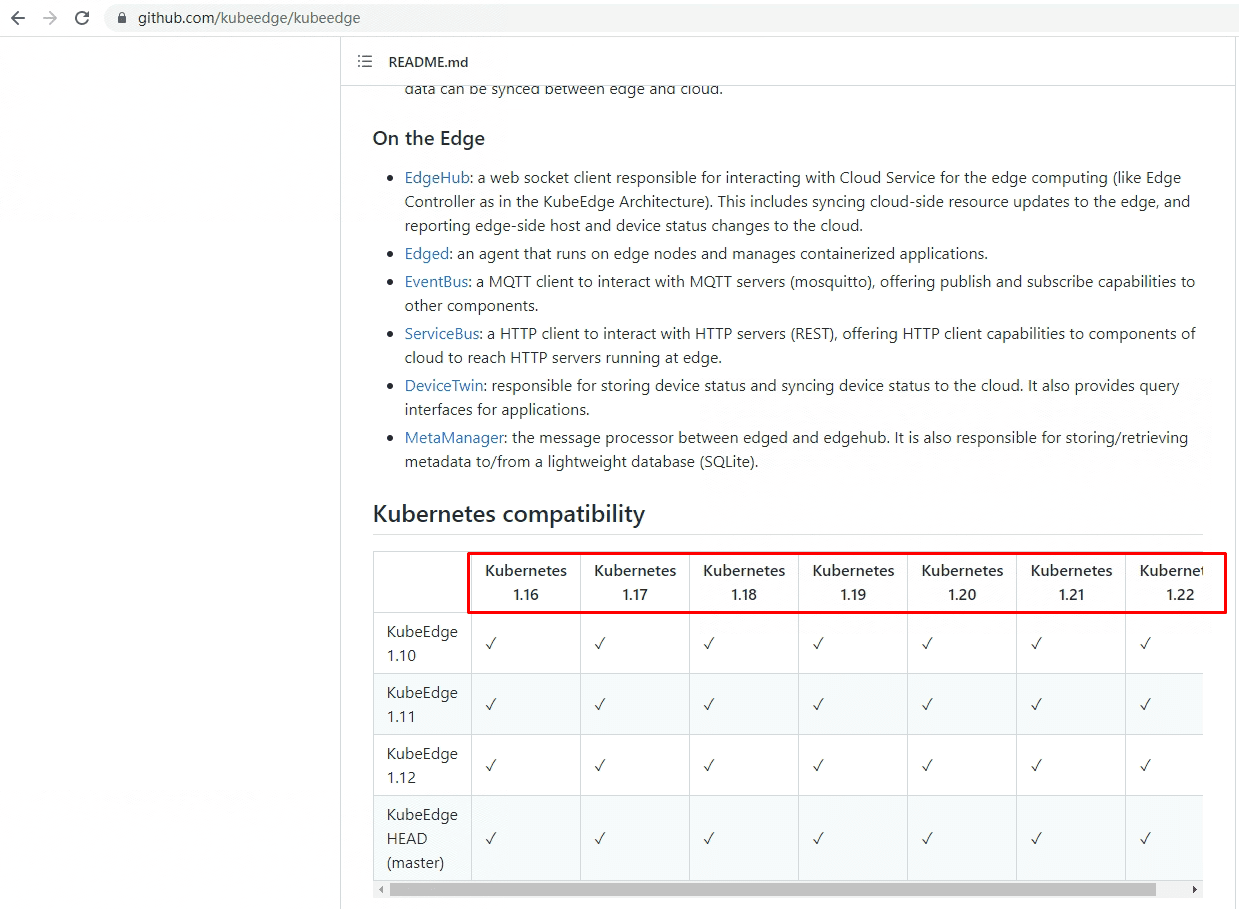
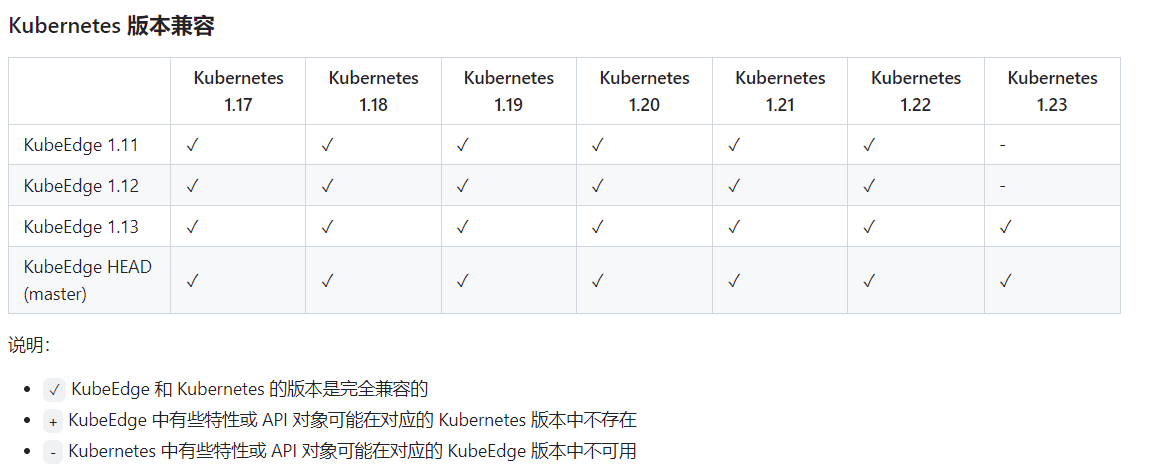
由于kubeedge支持k8s版本版本较低,不建议使用k8s 1.24、1.25、1.26集群版本。可参考github提供的版本支持依据。
1.2 基础服务提供 负载均衡器 metallb
由于需要为cloudcore与edgecore提供通信地址,建议使用LB为cloudcore提供公网IP或K8S集群节点相同网段IP地址,实际生产中使用的是公网IP地址。
1.2.1 安装ipset及ipvsadm
所有主机均需要操作。
安装ipset及ipvsadm
# yum -y install ipset ipvsadm
配置ipvsadm模块加载方式
添加需要加载的模块
# cat > /etc/sysconfig/modules/ipvs.modules <<EOF
#!/bin/bash
modprobe -- ip_vs
modprobe -- ip_vs_rr
modprobe -- ip_vs_wrr
modprobe -- ip_vs_sh
modprobe -- nf_conntrack
EOF授权、运行、检查是否加载
# chmod 755 /etc/sysconfig/modules/ipvs.modules && bash /etc/sysconfig/modules/ipvs.modules && lsmod | grep -e ip_vs -e nf_conntrack1.2.2 修改kube-proxy代理模式
kubectl edit configmap -n kube-system kube-proxyapiVersion: kubeproxy.config.k8s.io/v1alpha1
kind: KubeProxyConfiguration
mode: "ipvs"
ipvs:
strictARP: truekubectl rollout restart daemonset kube-proxy -n kube-system1.2.3 metallb部署及配置
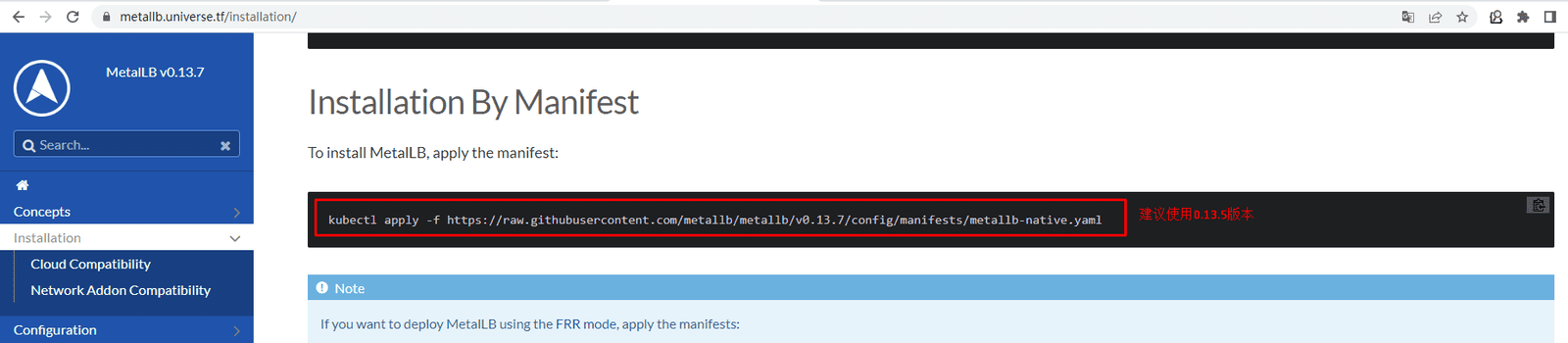
# kubectl apply -f https://raw.githubusercontent.com/metallb/metallb/v0.13.5/config/manifests/metallb-native.yaml创建全局IP地址池
[root@k8s-master01 ~]# vim first-ippool.yaml
[root@k8s-master01 ~]# cat first-ippool.yaml
apiVersion: metallb.io/v1beta1
kind: IPAddressPool
metadata:
name: first-pool
namespace: metallb-system
spec:
addresses:
- 192.168.10.200-192.168.10.210验证是否创建
[root@k8s-master01 ~]# kubectl get ipaddresspool -n metallb-system
NAME AGE
first-pool 23s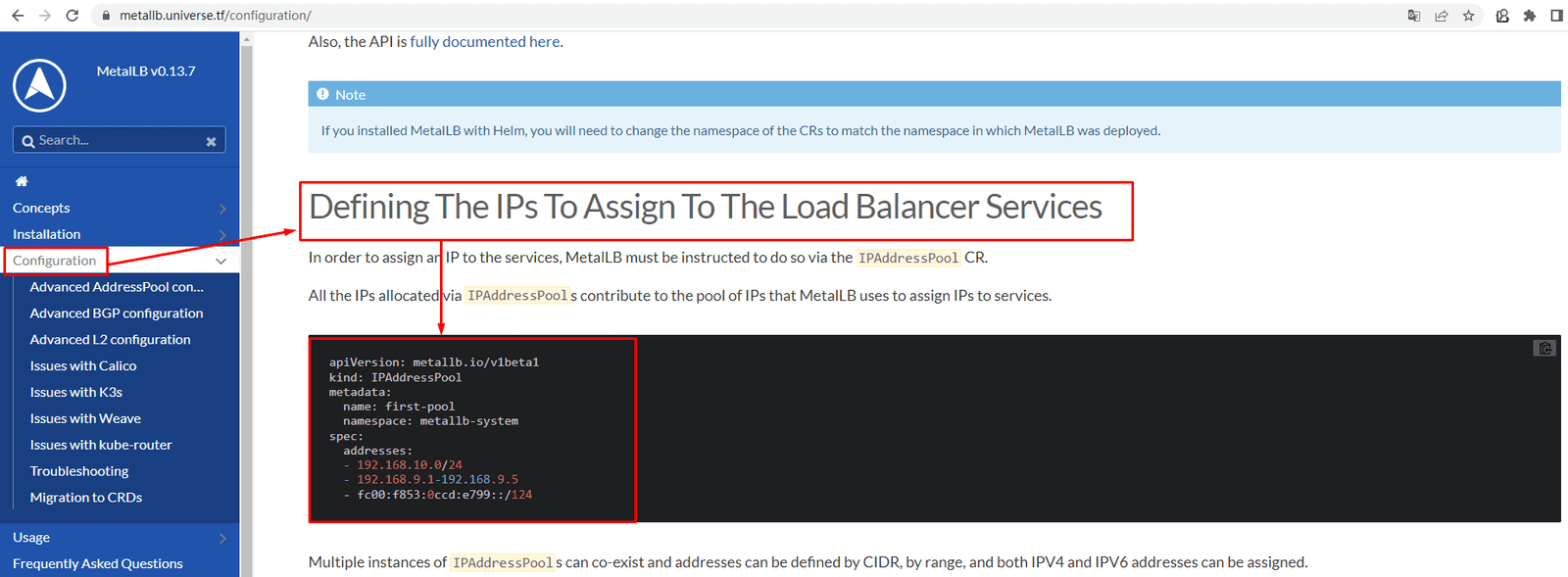
开启二层转发,实现在k8s集群节点外访问
[root@k8s-master01 ~]# vim l2forward.yaml
[root@k8s-master01 ~]# cat l2forward.yaml
apiVersion: metallb.io/v1beta1
kind: L2Advertisement
metadata:
  name: example
  namespace: metallb-system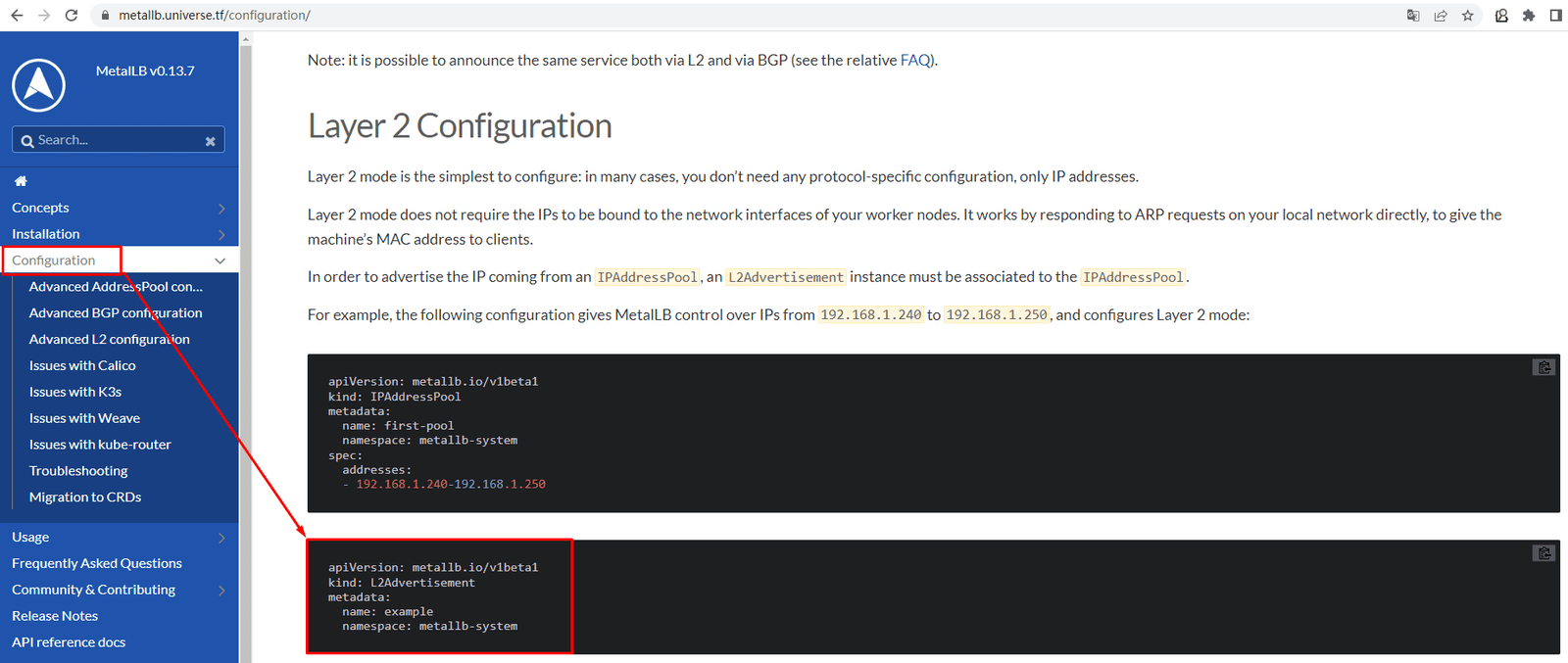
二、kubeedge架构
KubeEdge 是一个开源的系统,可将本机容器化应用编排和管理扩展到边缘端设备。它基于 Kubernetes 构建,为网络和应用程序提供核心基础架构支持,并在云端和边缘端部署应用,同步元数据。KubeEdge 还支持 MQTT 协议,允许开发人员编写客户逻辑,并在边缘端启用设备通信的资源约束。KubeEdge 包含云端和边缘端两部分。
使用 KubeEdge,可以很容易地将已有的复杂机器学习、图像识别、事件处理和其他高级应用程序部署到边缘端并进行使用。 随着业务逻辑在边缘端上运行,可以在本地保护和处理大量数据。 通过在边缘端处理数据,响应速度会显著提高,并且可以更好地保护数据隐私。
KubeEdge 是一个由 Cloud Native Computing Foundation (CNCF) 托管的孵化级项目,CNCF 对 KubeEdge 的 孵化公告
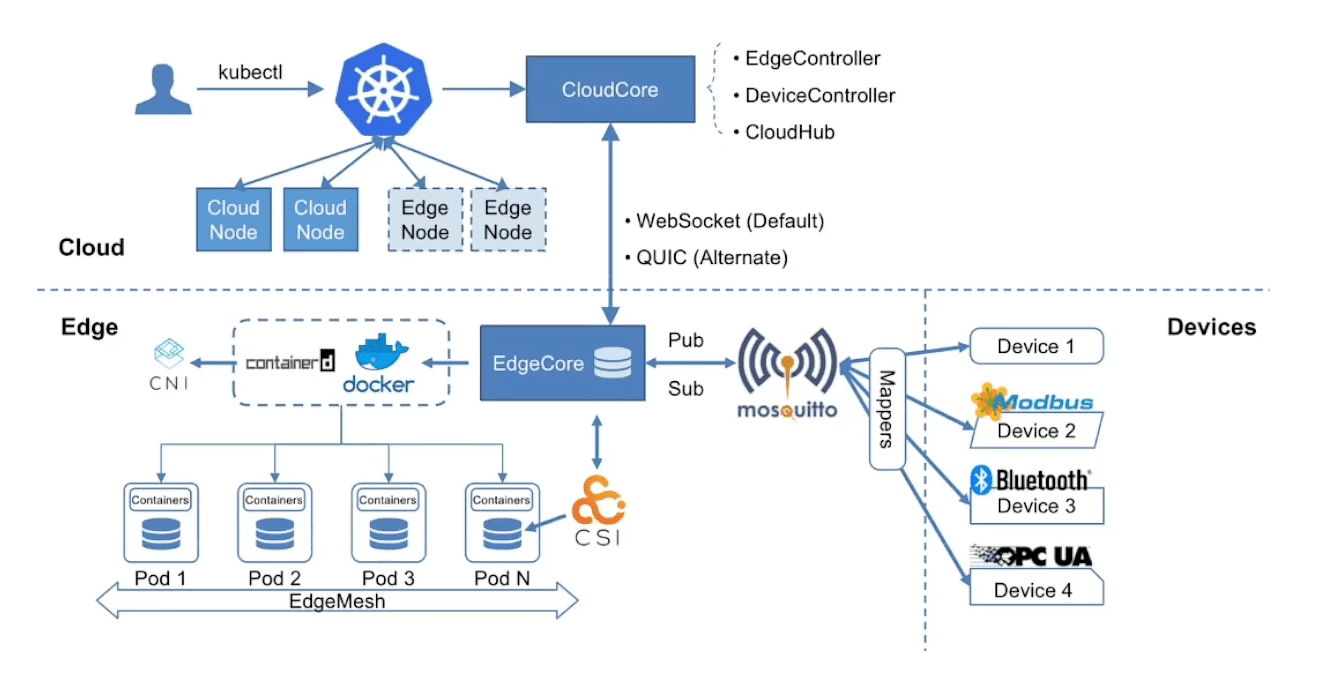
优势
- Kubernetes 原生支持:使用 KubeEdge 用户可以在边缘节点上编排应用、管理设备并监控应用程序/设备状态,就如同在云端操作 Kubernetes 集群一样。
- 云边可靠协作:在不稳定的云边网络上,可以保证消息传递的可靠性,不会丢失。
- 边缘自治:当云边之间的网络不稳定或者边缘端离线或重启时,确保边缘节点可以自主运行,同时确保边缘端的应用正常运行。
- 边缘设备管理:通过 Kubernetes 的原生API,并由CRD来管理边缘设备。
- 极致轻量的边缘代理:在资源有限的边缘端上运行的非常轻量级的边缘代理(EdgeCore)。
云上部分
- CloudHub: CloudHub 是一个 Web Socket 服务端,负责监听云端的变化,缓存并发送消息到 EdgeHub。
- EdgeController: EdgeController 是一个扩展的 Kubernetes 控制器,管理边缘节点和 Pods 的元数据确保数据能够传递到指定的边缘节点。
- DeviceController: DeviceController 是一个扩展的 Kubernetes 控制器,管理边缘设备,确保设备信息、设备状态的云边同步。
边缘部分
- EdgeHub: EdgeHub 是一个 Web Socket 客户端,负责与边缘计算的云服务(例如 KubeEdge 架构图中的 Edge Controller)交互,包括同步云端资源更新、报告边缘主机和设备状态变化到云端等功能。
- Edged: Edged 是运行在边缘节点的代理,用于管理容器化的应用程序。
- EventBus: EventBus 是一个与 MQTT 服务器 (mosquitto) 交互的 MQTT 客户端,为其他组件提供订阅和发布功能。
- ServiceBus: ServiceBus 是一个运行在边缘的 HTTP 客户端,接受来自云上服务的请求,与运行在边缘端的 HTTP 服务器交互,提供了云上服务通过 HTTP 协议访问边缘端 HTTP 服务器的能力。
- DeviceTwin: DeviceTwin 负责存储设备状态并将设备状态同步到云,它还为应用程序提供查询接口。
- MetaManager: MetaManager 是消息处理器,位于 Edged 和 Edgehub 之间,它负责向轻量级数据库 (SQLite) 存储/检索元数据。
三、kubeedge cloudcore 云端部署
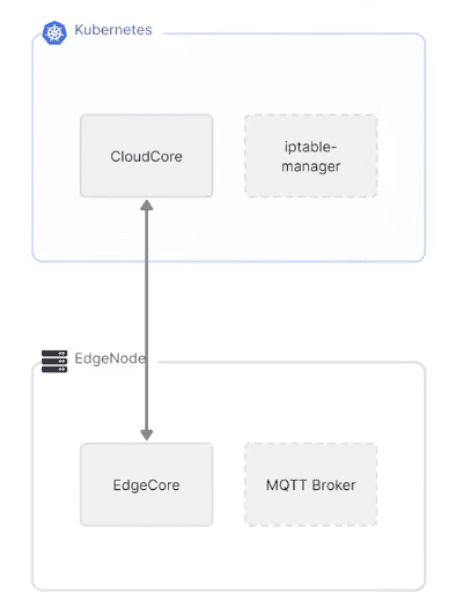
3.1 获取keadm工具
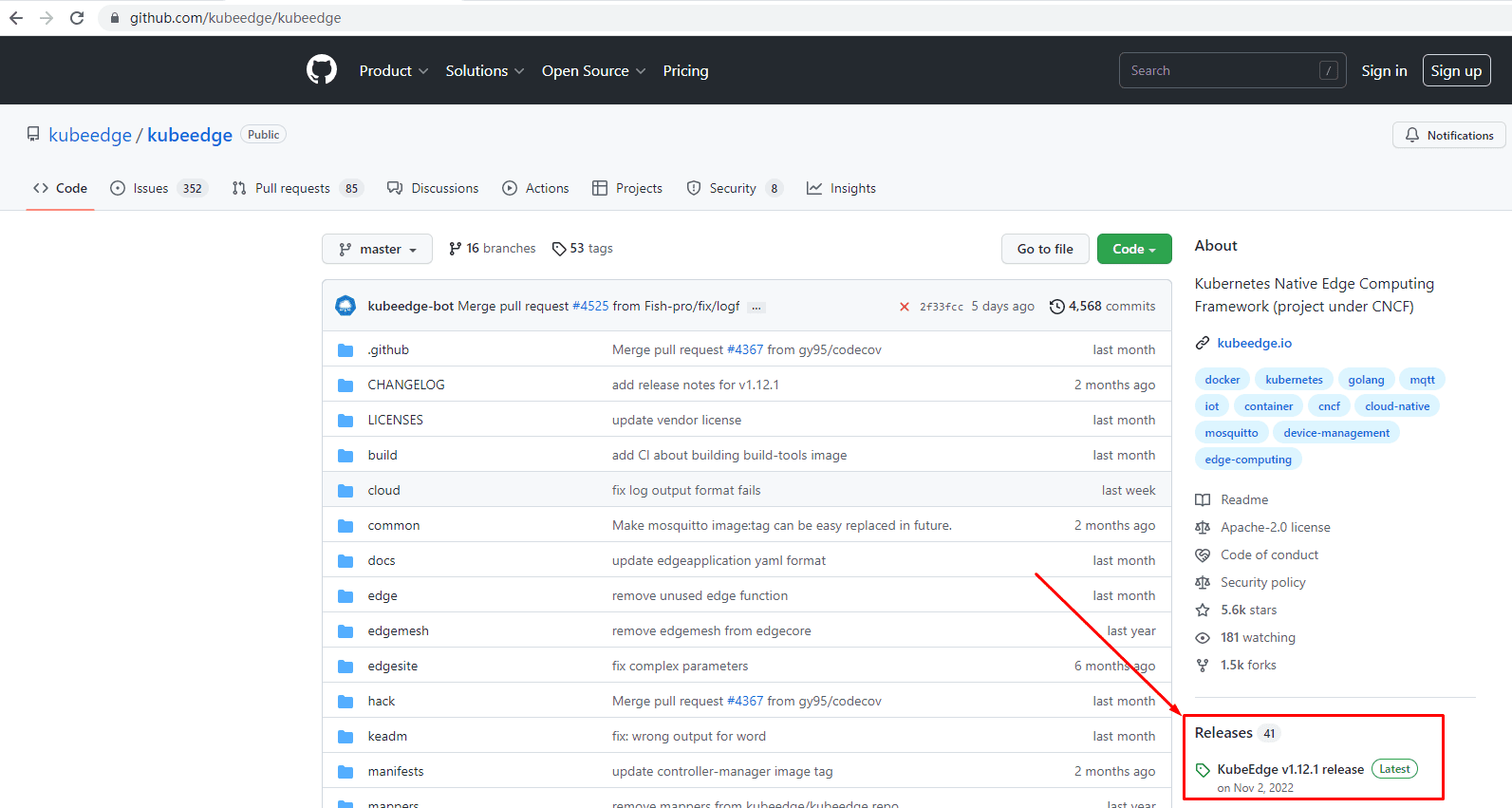
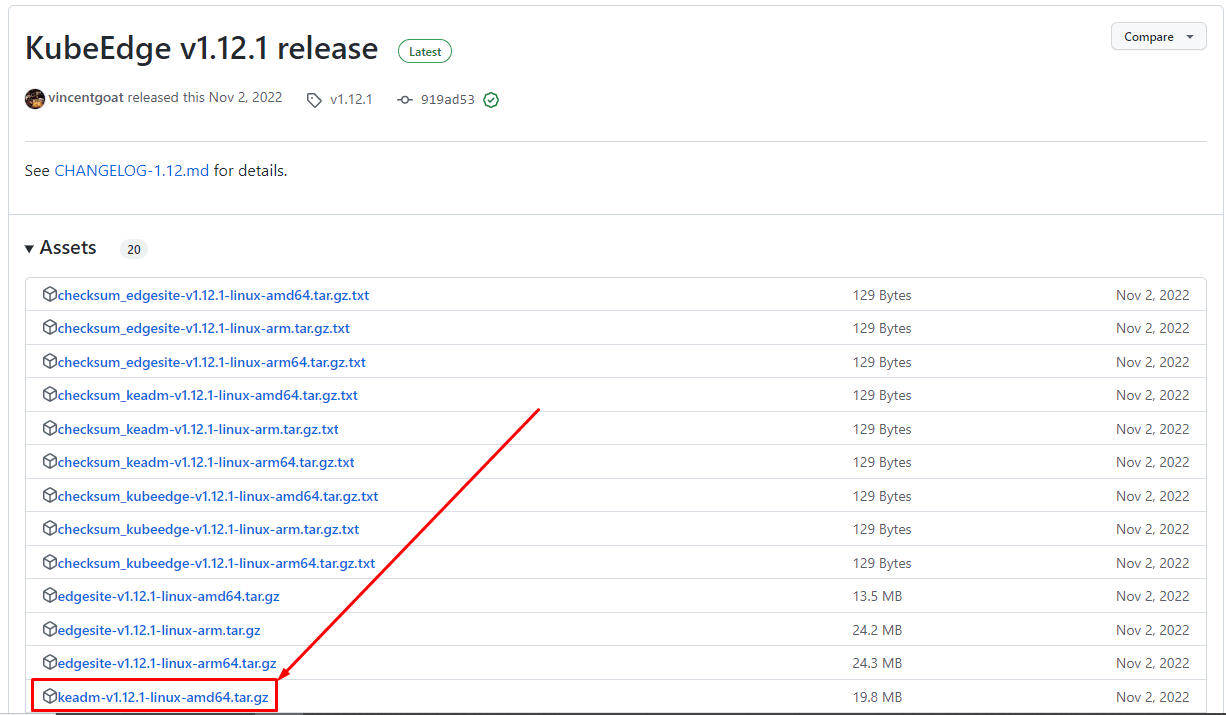
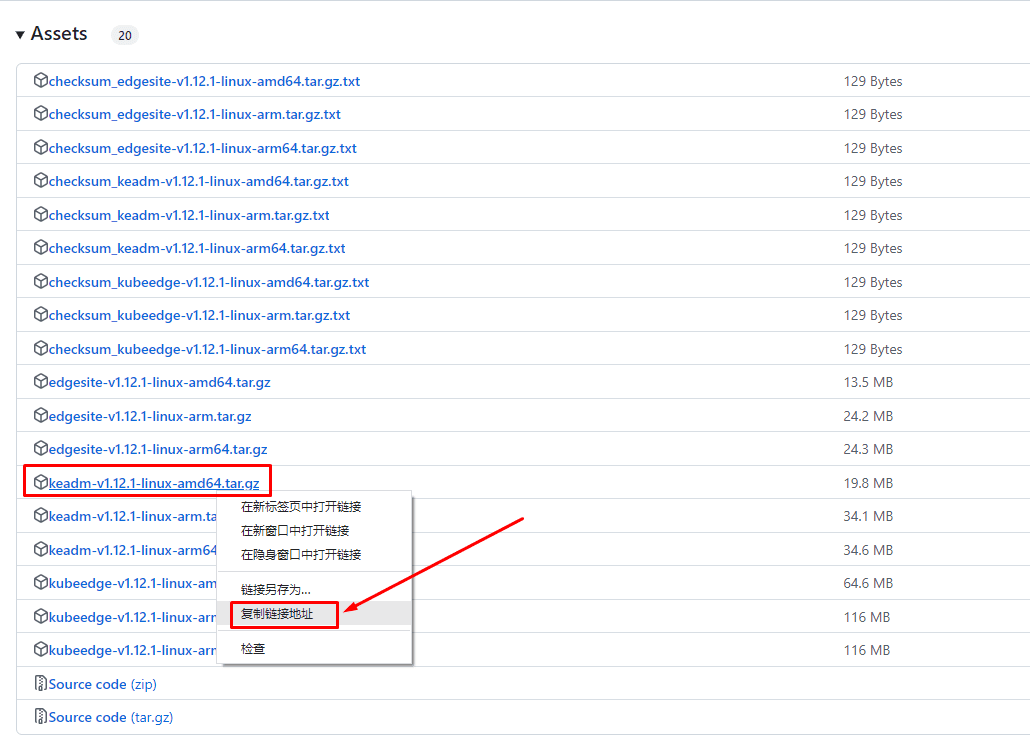
[root@k8s-master01 ~]# wget https://github.com/kubeedge/kubeedge/releases/download/v1.12.1/keadm-v1.12.1-linux-amd64.tar.gz[root@k8s-master01 ~]# ls
keadm-v1.12.1-linux-amd64.tar.gz[root@k8s-master01 ~]# tar xf keadm-v1.12.1-linux-amd64.tar.gz
[root@k8s-master01 ~]# ls
keadm-v1.12.1-linux-amd64.tar.gz keadm-v1.12.1-linux-amd64[root@k8s-master01 ~]# ls keadm-v1.12.1-linux-amd64
keadm version
[root@k8s-master01 ~]# ls keadm-v1.12.1-linux-amd64/keadm/
keadm
[root@k8s-master01 ~]# mv keadm-v1.12.1-linux-amd64/keadm/keadm /usr/local/bin/[root@k8s-master01 ~]# keadm
+----------------------------------------------------------+
| KEADM |
| Easily bootstrap a KubeEdge cluster |
| |
| Please give us feedback at: |
| https://github.com/kubeedge/kubeedge/issues |
+----------------------------------------------------------+
Create a cluster with cloud node
(which controls the edge node cluster), and edge nodes
(where native containerized application, in the form of
pods and deployments run), connects to devices.
Usage:
keadm [command]
Examples:
+----------------------------------------------------------+
| On the cloud machine: |
+----------------------------------------------------------+
| master node (on the cloud)# sudo keadm init |
+----------------------------------------------------------+
+----------------------------------------------------------+
| On the edge machine: |
+----------------------------------------------------------+
| worker node (at the edge)# sudo keadm join <flags> |
+----------------------------------------------------------+
You can then repeat the second step on, as many other machines as you like.
Available Commands:
completion generate the autocompletion script for the specified shell
config Use this command to configure keadm
debug debug function to help diagnose the cluster
deprecated keadm deprecated command
gettoken To get the token for edge nodes to join the cluster
help Help about any command
init Bootstraps cloud component. Checks and install (if required) the pre-requisites.
join Bootstraps edge component. Checks and install (if required) the pre-requisites. Execute it on any edge node machine you wish to join
manifest Render the manifests by using a list of set flags like helm.
reset Teardowns KubeEdge (cloud(helm installed) & edge) component
upgrade Upgrade edge component. Upgrade the edge node to the desired version.
version Print the version of keadm
Flags:
-h, --help help for keadm
Additional help topics:
keadm beta keadm beta command
Use "keadm [command] --help" for more information about a command.3.2 cloudcore部署
[root@k8s-master01 ~]# keadm init --advertise-address=192.168.10.200 --set iptablesManager.mode="external" --profile version=v1.12.1
Kubernetes version verification passed, KubeEdge installation will start...
CLOUDCORE started
=========CHART DETAILS=======
NAME: cloudcore
LAST DEPLOYED: Sun Jan  8 21:52:24 2023
NAMESPACE: kubeedge
STATUS: deployed
REVISION: 1[root@k8s-master01 ~]# kubectl get ns
NAME STATUS AGE
calico-apiserver Active 13m
calico-system Active 15m
default Active 18m
kube-node-lease Active 18m
kube-public Active 18m
kube-system Active 18m
kubeedge Active 30s 在这里
tigera-operator Active 16m[root@k8s-master01 ~]# kubectl get pods -n kubeedge
NAME READY STATUS RESTARTS AGE
cloud-iptables-manager-5hdtp 1/1 Running 0 58s
cloud-iptables-manager-lsmmd 1/1 Running 0 58s
cloudcore-5876c76687-8rtj4 1/1 Running 0 57s[root@k8s-master01 ~]# kubectl get svc -n kubeedge
NAME TYPE CLUSTER-IP EXTERNAL-IP PORT(S) AGE
cloudcore ClusterIP 10.110.216.131 <none> 10000/TCP,10001/TCP,10002/TCP,10003/TCP,10004/TCP 57s[root@k8s-master01 ~]# kubectl edit svc cloudcore -n kubeedge
service/cloudcore edited修改位置:
selector:
k8s-app: kubeedge
kubeedge: cloudcore
sessionAffinity: None
type: LoadBalancer 此处由clusterIP修改为LoadBalancer
LoadBalancerIP: 192.168.10.200[root@k8s-master01 ~]# kubectl get svc -n kubeedge
NAME TYPE CLUSTER-IP EXTERNAL-IP PORT(S) AGE
cloudcore LoadBalancer 10.98.223.240 192.168.10.200 10000:32400/TCP,10001:32049/TCP,10002:31062/TCP,10003:32041/TCP,10004:32174/TCP 75s设置daemonset部署的应用仅调度到不具有node-role.kubernetes.io/edge节点上。即阻止daemonset部署的应用调度到边缘节点。
[root@k8s-master01 ~]# kubectl get daemonset -n kube-system | grep -v NAME | awk '{print $1}' | xargs -n 1 kubectl patch daemonset -n kube-system --type='json' -p='[{"op": "replace", "path": "/spec/template/spec/affinity", "value":{"nodeAffinity":{"requiredDuringSchedulingIgnoredDuringExecution":{"nodeSelectorTerms":[{"matchExpressions":[{"key":"node-role.kubernetes.io/edge","operator":"DoesNotExist"}]}]}}}}]'
daemonset.apps/kube-proxy patched[root@k8s-master01 ~]# kubectl get daemonset -n metallb-system | grep -v NAME | awk '{print $1}' | xargs -n 1 kubectl patch daemonset -n metallb-system --type='json' -p='[{"op": "replace", "path": "/spec/template/spec/affinity", "value":{"nodeAffinity":{"requiredDuringSchedulingIgnoredDuringExecution":{"nodeSelectorTerms":[{"matchExpressions":[{"key":"node-role.kubernetes.io/edge","operator":"DoesNotExist"}]}]}}}}]'
daemonset.apps/speaker patched[root@k8s-master01 ~]# kubectl get daemonset -n calico-system | grep -v NAME | awk '{print $1}' | xargs -n 1 kubectl patch daemonset -n calico-system --type='json' -p='[{"op": "replace", "path": "/spec/template/spec/affinity", "value":{"nodeAffinity":{"requiredDuringSchedulingIgnoredDuringExecution":{"nodeSelectorTerms":[{"matchExpressions":[{"key":"node-role.kubernetes.io/edge","operator":"DoesNotExist"}]}]}}}}]'
daemonset.apps/calico-node patched
daemonset.apps/csi-node-driver patched部署metrics-server用于查看边缘节点上应用使用。
[root@k8s-master01 ~]# kubectl apply -f https://github.com/kubernetes-sigs/metrics-server/releases/latest/download/components.yaml
serviceaccount/metrics-server created
clusterrole.rbac.authorization.k8s.io/system:aggregated-metrics-reader created
clusterrole.rbac.authorization.k8s.io/system:metrics-server created
rolebinding.rbac.authorization.k8s.io/metrics-server-auth-reader created
clusterrolebinding.rbac.authorization.k8s.io/metrics-server:system:auth-delegator created
clusterrolebinding.rbac.authorization.k8s.io/system:metrics-server created
service/metrics-server created
deployment.apps/metrics-server created
apiservice.apiregistration.k8s.io/v1beta1.metrics.k8s.io created[root@k8s-master01 ~]# kubectl get pods -n kube-system
NAME READY STATUS RESTARTS AGE
coredns-7bdbbf6bf5-2ftxd 1/1 Running 1 (13h ago) 13h
coredns-7bdbbf6bf5-l292b 1/1 Running 1 (13h ago) 13h
etcd-k8s-master01 1/1 Running 1 (13h ago) 13h
kube-apiserver-k8s-master01 1/1 Running 1 (13h ago) 13h
kube-controller-manager-k8s-master01 1/1 Running 1 (13h ago) 13h
kube-proxy-j7674 1/1 Running 0 8m42s
kube-proxy-t8nrc 1/1 Running 0 8m43s
kube-proxy-zh5qw 1/1 Running 0 8m40s
kube-scheduler-k8s-master01 1/1 Running 1 (13h ago) 13h
metrics-server-684454657f-rgwhp 0/1 Running 0 10s[root@k8s-master01 ~]# kubectl patch deploy metrics-server -n kube-system --type='json' -p='[{"op":"add","path": "/spec/template/spec/containers/0/args/-","value":"--kubelet-insecure-tls"}]'
deployment.apps/metrics-server patched[root@k8s-master01 ~]# kubectl get pods -n kube-system
NAME READY STATUS RESTARTS AGE
coredns-7bdbbf6bf5-2ftxd 1/1 Running 1 (13h ago) 13h
coredns-7bdbbf6bf5-l292b 1/1 Running 1 (13h ago) 13h
etcd-k8s-master01 1/1 Running 1 (13h ago) 13h
kube-apiserver-k8s-master01 1/1 Running 1 (13h ago) 13h
kube-controller-manager-k8s-master01 1/1 Running 1 (13h ago) 13h
kube-proxy-j7674 1/1 Running 0 15m
kube-proxy-t8nrc 1/1 Running 0 15m
kube-proxy-zh5qw 1/1 Running 0 15m
kube-scheduler-k8s-master01 1/1 Running 1 (13h ago) 13h
metrics-server-85bc67fbcd-4lgvn 1/1 Running 0 2m7s[root@k8s-master01 ~]# iptables -t nat -A OUTPUT -p tcp --dport 10351 -j DNAT --to 192.168.10.200:10003四、kubeedge edgecore 边缘端部署
主机配置、操作系统、kubeedge版本等。
部署思路:安装容器运行时、从云端获取join token、安装EdgeCore、开启EdgeStream
[root@localhost ~]# hostnamectl set-hostname edgenode-1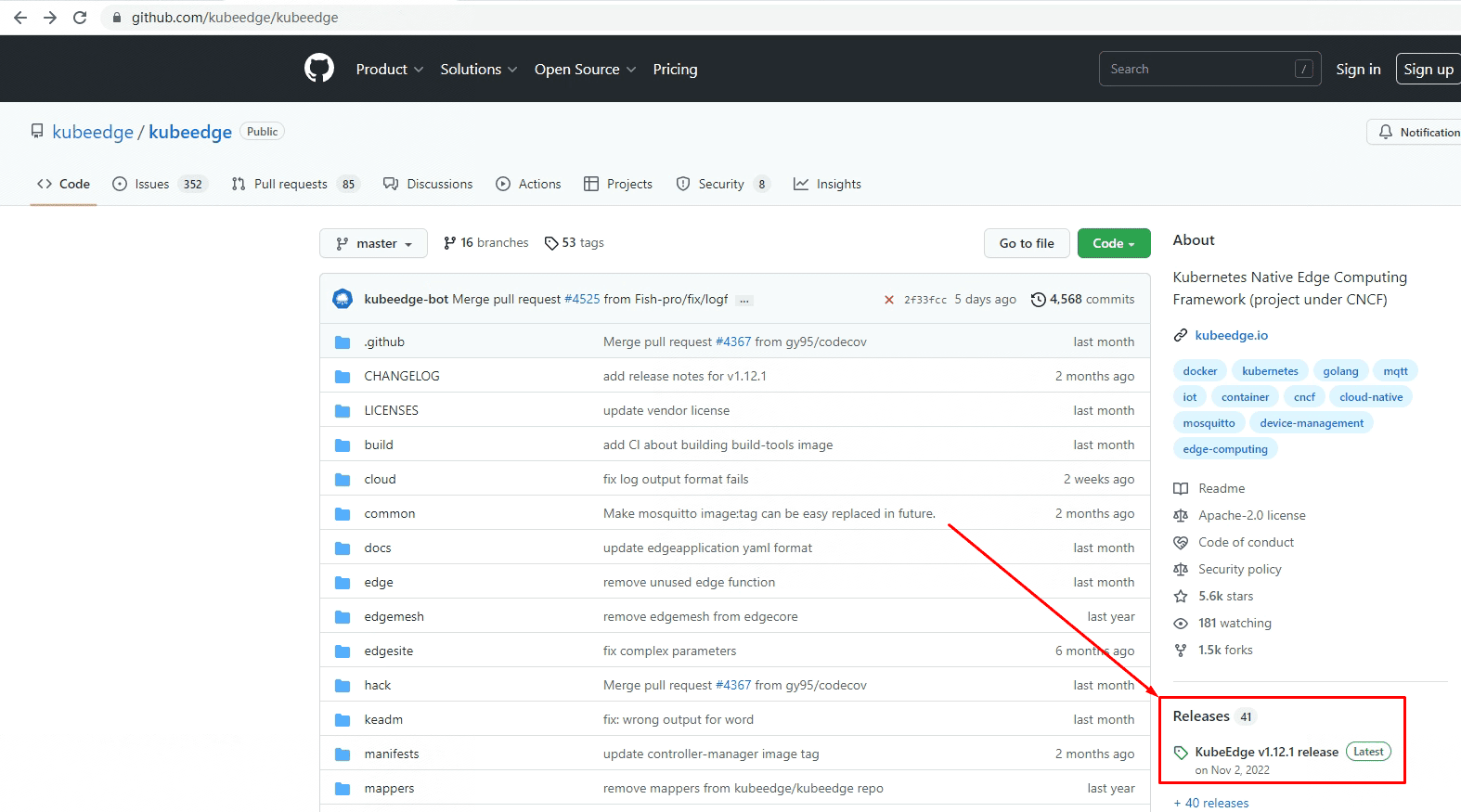
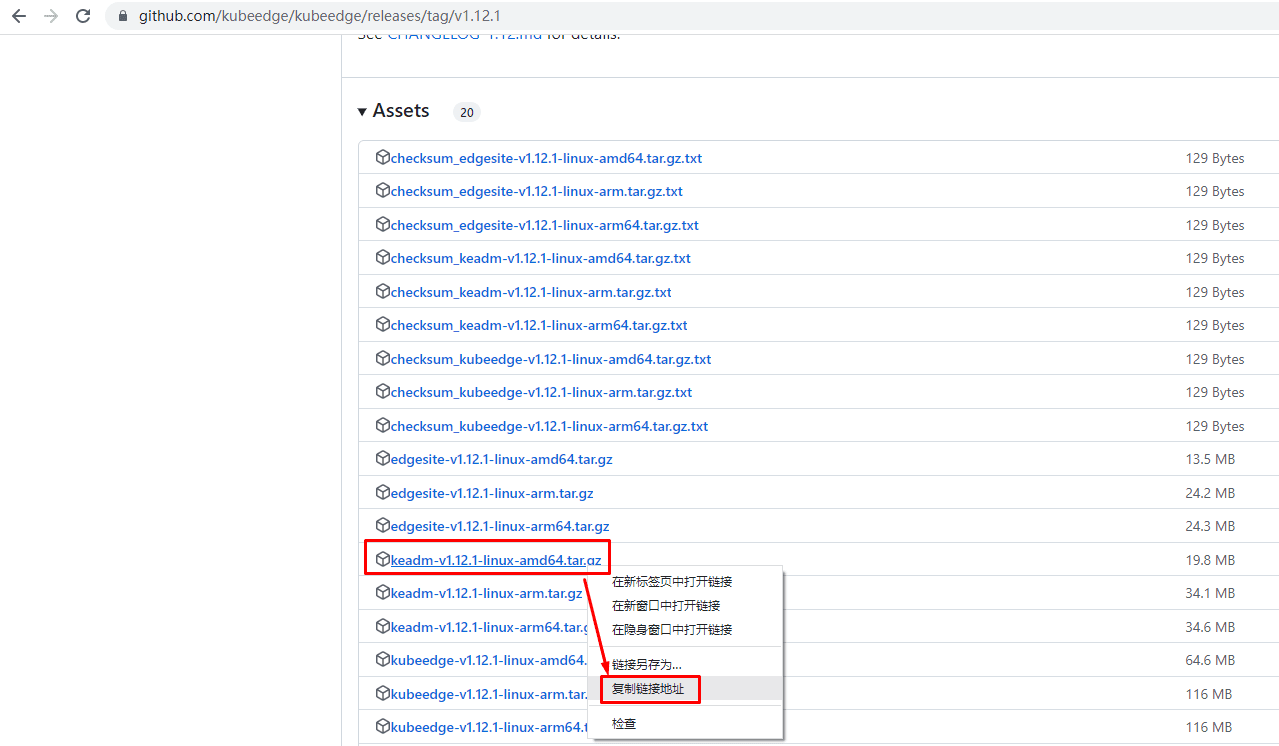
[root@edgenode-1 ~]# wget https://github.com/kubeedge/kubeedge/releases/download/v1.12.1/keadm-v1.12.1-linux-amd64.tar.gz[root@edgenode-1 ~]# tar xf keadm-v1.12.1-linux-amd64.tar.gz[root@edgenode-1 ~]# mv keadm-v1.12.1-linux-amd64/keadm/keadm /usr/local/bin/[root@edgenode-1 ~]# keadm
+----------------------------------------------------------+
| KEADM |
| Easily bootstrap a KubeEdge cluster |
| |
| Please give us feedback at: |
| https://github.com/kubeedge/kubeedge/issues |
+----------------------------------------------------------+
Create a cluster with cloud node
(which controls the edge node cluster), and edge nodes
(where native containerized application, in the form of
pods and deployments run), connects to devices.
Usage:
keadm [command]
Examples:
+----------------------------------------------------------+
| On the cloud machine: |
+----------------------------------------------------------+
| master node (on the cloud)# sudo keadm init |
+----------------------------------------------------------+
+----------------------------------------------------------+
| On the edge machine: |
+----------------------------------------------------------+
| worker node (at the edge)# sudo keadm join <flags> |
+----------------------------------------------------------+
You can then repeat the second step on, as many other machines as you like.
Available Commands:
completion generate the autocompletion script for the specified shell
config Use this command to configure keadm
debug debug function to help diagnose the cluster
deprecated keadm deprecated command
gettoken To get the token for edge nodes to join the cluster
help Help about any command
init Bootstraps cloud component. Checks and install (if required) the pre-requisites.
join Bootstraps edge component. Checks and install (if required) the pre-requisites. Execute it on any edge node machine you wish to join
manifest Render the manifests by using a list of set flags like helm.
reset Teardowns KubeEdge (cloud(helm installed) & edge) component
upgrade Upgrade edge component. Upgrade the edge node to the desired version.
version Print the version of keadm
Flags:
-h, --help help for keadm
Additional help topics:
keadm beta keadm beta command
Use "keadm [command] --help" for more information about a command.[root@edgenode-1 ~]# wget https://mirrors.aliyun.com/docker-ce/linux/centos/docker-ce.repo -O /etc/yum.repos.d/docker-ce.repo[root@edgenode-1 ~]# yum -y install docker-ce[root@edgenode-1 ~]# systemctl enable --now docker[root@k8s-master01 ~]# keadm gettoken
bec7e346f2b62b87bb01cb8082111b05759aa16ba298d7b97442581c3bccee52.eyJhbGciOiJIUzI1NiIsInR5cCI6IkpXVCJ9.eyJleHAiOjE2NzMzMjI1Mjd9.BzQiyUFBp1dax9NC7BOssRe4Pgj wOE24w2jE7S8Hp-0[root@edgenode-1 ~]# TOKEN=bec7e346f2b62b87bb01cb8082111b05759aa16ba298d7b97442581c3bccee52.eyJhbGciOiJIUzI1NiIsInR5cCI6IkpXVCJ9.eyJleHAiOjE2NzMzMjI1Mjd9. BzQiyUFBp1dax9NC7BOssRe4PgjwOE24w2jE7S8Hp-0[root@edgenode-1 ~]# SERVER=192.168.10.200:10000[root@edgenode-1 ~]# keadm join --token=$TOKEN --cloudcore-ipport=$SERVER --kubeedge-version=1.12.1输出内容:
I0109 11:53:10.734725 11811 command.go:845] 1. Check KubeEdge edgecore process status
I0109 11:53:10.743044 11811 command.go:845] 2. Check if the management directory is clean
I0109 11:53:10.743129 11811 join.go:100] 3. Create the necessary directories
I0109 11:53:10.744103 11811 join.go:176] 4. Pull Images
Pulling kubeedge/installation-package:v1.12.1 ...
Pulling eclipse-mosquitto:1.6.15 ...
Pulling kubeedge/pause:3.1 ...
I0109 11:53:10.749692 11811 join.go:176] 5. Copy resources from the image to the management directory
I0109 11:53:11.324868 11811 join.go:176] 6. Start the default mqtt service
I0109 11:53:11.630975 11811 join.go:100] 7. Generate systemd service file
I0109 11:53:11.631178 11811 join.go:100] 8. Generate EdgeCore default configuration
I0109 11:53:11.631211 11811 join.go:230] The configuration does not exist or the parsing fails, and the default configuration is generated
W0109 11:53:11.744671 11811 validation.go:71] NodeIP is empty , use default ip which can connect to cloud.
I0109 11:53:11.746621 11811 join.go:100] 9. Run EdgeCore daemon
I0109 11:53:11.923574 11811 join.go:317]
I0109 11:53:11.923594 11811 join.go:318] KubeEdge edgecore is running, For logs visit: journalctl -u edgecore.service -xe[root@k8s-master01 ~]# kubectl get nodes
NAME STATUS ROLES AGE VERSION
edgenode-1 Ready agent,edge 88m v1.22.6-kubeedge-v1.12.1
k8s-master01 Ready control-plane,master 15h v1.22.17
k8s-worker01 Ready <none> 15h v1.22.17
k8s-worker02 Ready <none> 15h v1.22.17[root@edgenode-1 ~]# systemctl status edgecore
● edgecore.service
Loaded: loaded (/etc/systemd/system/edgecore.service; enabled; vendor preset: disabled)
Active: active (running) since 一 2023-01-09 11:53:11 CST; 13s ago
Main PID: 12058 (edgecore)
Tasks: 14
Memory: 44.6M
CGroup: /system.slice/edgecore.service
└─12058 /usr/local/bin/edgecore
1月 09 11:53:12 edgenode-1 edgecore[12058]: E0109 11:53:12.508148 12058 kubelet.go:1831] "Skipping pod synchronization" err="container runti...ted yet"
1月 09 11:53:12 edgenode-1 edgecore[12058]: E0109 11:53:12.909472 12058 kubelet.go:1831] "Skipping pod synchronization" err="container runti...ted yet"
1月 09 11:53:13 edgenode-1 edgecore[12058]: E0109 11:53:13.711153 12058 kubelet.go:1831] "Skipping pod synchronization" err="container runti...ted yet"
1月 09 11:53:15 edgenode-1 edgecore[12058]: E0109 11:53:15.312124 12058 kubelet.go:1831] "Skipping pod synchronization" err="container runti...ted yet"
1月 09 11:53:18 edgenode-1 edgecore[12058]: E0109 11:53:18.512561 12058 kubelet.go:1831] "Skipping pod synchronization" err="container runti...ted yet"
1月 09 11:53:22 edgenode-1 edgecore[12058]: I0109 11:53:22.170516 12058 reconciler.go:157] "Reconciler: start to sync state"
1月 09 11:53:22 edgenode-1 edgecore[12058]: I0109 11:53:22.329807 12058 kuberuntime_manager.go:1078] "Updating runtime config through cri wi....3.0/24"
1月 09 11:53:22 edgenode-1 edgecore[12058]: I0109 11:53:22.330123 12058 docker_service.go:363] "Docker cri received runtime config" runtimeC.../24,},}"
1月 09 11:53:22 edgenode-1 edgecore[12058]: I0109 11:53:22.330276 12058 kubelet_network.go:62] "Updating Pod CIDR" originalPodCIDR="" newPod....3.0/24"
1月 09 11:53:23 edgenode-1 edgecore[12058]: E0109 11:53:23.514067 12058 kubelet.go:1831] "Skipping pod synchronization" err="container runti...ted yet"
Hint: Some lines were ellipsized, use -l to show in full.edgecore配置文件位置
[root@edgenode-1 ~]# cat /etc/kubeedge/config/edgecore.yaml[root@edgenode-1 ~]# journalctl -u edgecore.service -f[root@edgenode-1 ~]# docker ps
CONTAINER ID IMAGE COMMAND CREATED STATUS PORTS NAMES
c658285c03d9 eclipse-mosquitto:1.6.15 "/docker-entrypoint.…" 22 seconds ago Up 22 seconds 0.0.0.0:1883->1883/tcp, :::1883->1883/tcp mqtt五、通过kubeedge部署nginx应用并实现访问
[root@k8s-master01 ~]# vim nginx.yaml
[root@k8s-master01 ~]# cat nginx.yaml
---
apiVersion: apps/v1
kind: Deployment
metadata:
  name: nginx
spec:
  selector:
    matchLabels:
      app: nginx
  replicas: 1
  template:
    metadata:
      labels:
        app: nginx
    spec:
      nodeName: edgenode-1
      containers:
      - name: nginx
        image: nginx:latest
---
apiVersion: v1
kind: Service
metadata:
  name: nginx-svc
spec:
  type: LoadBalancer
  ports:
  - port: 80
    targetPort: 80
  selector:
app: nginx[root@k8s-master01 ~]# kubectl apply -f nginx.yaml
deployment.apps/nginx created
service/nginx-svc created[root@k8s-master01 ~]# kubectl get pods -o wide
NAME READY STATUS RESTARTS AGE IP NODE NOMINATED NODE READINESS GATES
nginx-7c994ccd94-cnstq 1/1 Running 0 26s 172.17.0.6 edgenode-1 <none> <none>[root@k8s-master01 ~]# kubectl get svc
NAME TYPE CLUSTER-IP EXTERNAL-IP PORT(S) AGE
nginx-svc LoadBalancer 10.107.115.15 192.168.10.201 80:31886/TCP 47s[root@k8s-master01 ~]# kubectl exec -it nginx-7c994ccd94-g9d5p -- /bin/bash
root@nginx-7c994ccd94-g9d5p:/#
root@nginx-7c994ccd94-g9d5p:/# pwd
/
root@nginx-7c994ccd94-g9d5p:/# ls
bin boot dev docker-entrypoint.d docker-entrypoint.sh etc home lib lib64 media mnt opt proc root run sbin srv sys tmp usr var六、查看已部署到边缘侧应用日志
[root@edgenode-1 ~]# ls /etc/kubeedge/
ca  certs  config  dmi.sock
[root@edgenode-1 ~]# ls /etc/kubeedge/config/
edgecore.yaml
[root@edgenode-1 ~]# vim /etc/kubeedge/config/edgecore.yaml
edgeStream:
enable: true 此处由flase修改为true
handshakeTimeout: 30
readDeadline: 15
server: 192.168.10.200:10004[root@edgenode-1 ~]# systemctl restart edgecore[root@edgenode-1 ~]# docker ps
CONTAINER ID IMAGE COMMAND CREATED STATUS PORTS NAMES
35ea17f6790f nginx "/docker-entrypoint.…" 3 minutes ago Up 3 minutes k8s_nginx_nginx-7c994ccd94-g9d5p_default_762eb218-58e8-441a-8951-152438bc17b7_0
d9c778946274 kubeedge/pause:3.1 "/pause" 3 minutes ago Up 3 minutes k8s_POD_nginx-7c994ccd94-g9d5p_default_762eb218-58e8-441a-8951-152438bc17b7_0[root@edgenode-1 ~]# docker logs 35ea17f6790f
/docker-entrypoint.sh: /docker-entrypoint.d/ is not empty, will attempt to perform configuration
/docker-entrypoint.sh: Looking for shell scripts in /docker-entrypoint.d/
/docker-entrypoint.sh: Launching /docker-entrypoint.d/10-listen-on-ipv6-by-default.sh
10-listen-on-ipv6-by-default.sh: info: Getting the checksum of /etc/nginx/conf.d/default.conf
10-listen-on-ipv6-by-default.sh: info: Enabled listen on IPv6 in /etc/nginx/conf.d/default.conf
/docker-entrypoint.sh: Launching /docker-entrypoint.d/20-envsubst-on-templates.sh
/docker-entrypoint.sh: Launching /docker-entrypoint.d/30-tune-worker-processes.sh
/docker-entrypoint.sh: Configuration complete; ready for start up
2023/01/09 13:28:26 [notice] 1#1: using the "epoll" event method
2023/01/09 13:28:26 [notice] 1#1: nginx/1.23.3
2023/01/09 13:28:26 [notice] 1#1: built by gcc 10.2.1 20210110 (Debian 10.2.1-6)
2023/01/09 13:28:26 [notice] 1#1: OS: Linux 5.4.213-1.el7.elrepo.x86_64
2023/01/09 13:28:26 [notice] 1#1: getrlimit(RLIMIT_NOFILE): 1048576:1048576
2023/01/09 13:28:26 [notice] 1#1: start worker processes
2023/01/09 13:28:26 [notice] 1#1: start worker process 29
2023/01/09 13:28:26 [notice] 1#1: start worker process 30
2023/01/09 13:28:26 [notice] 1#1: start worker process 31
2023/01/09 13:28:26 [notice] 1#1: start worker process 32[root@k8s-master01 ~]# kubectl logs nginx-7c994ccd94-g9d5p
/docker-entrypoint.sh: /docker-entrypoint.d/ is not empty, will attempt to perform configuration
/docker-entrypoint.sh: Looking for shell scripts in /docker-entrypoint.d/
/docker-entrypoint.sh: Launching /docker-entrypoint.d/10-listen-on-ipv6-by-default.sh
10-listen-on-ipv6-by-default.sh: info: Getting the checksum of /etc/nginx/conf.d/default.conf
10-listen-on-ipv6-by-default.sh: info: Enabled listen on IPv6 in /etc/nginx/conf.d/default.conf
/docker-entrypoint.sh: Launching /docker-entrypoint.d/20-envsubst-on-templates.sh
/docker-entrypoint.sh: Launching /docker-entrypoint.d/30-tune-worker-processes.sh
/docker-entrypoint.sh: Configuration complete; ready for start up
2023/01/09 13:28:26 [notice] 1#1: using the "epoll" event method
2023/01/09 13:28:26 [notice] 1#1: nginx/1.23.3
2023/01/09 13:28:26 [notice] 1#1: built by gcc 10.2.1 20210110 (Debian 10.2.1-6)
2023/01/09 13:28:26 [notice] 1#1: OS: Linux 5.4.213-1.el7.elrepo.x86_64
2023/01/09 13:28:26 [notice] 1#1: getrlimit(RLIMIT_NOFILE): 1048576:1048576
2023/01/09 13:28:26 [notice] 1#1: start worker processes
2023/01/09 13:28:26 [notice] 1#1: start worker process 29
2023/01/09 13:28:26 [notice] 1#1: start worker process 30
2023/01/09 13:28:26 [notice] 1#1: start worker process 31
2023/01/09 13:28:26 [notice] 1#1: start worker process 32