
Service Mesh 与 Istio——Sidecar 架构与 Bookinfo
Kubernetes 系列 · 第 30/35 篇
上一篇:《网络进阶——Cilium、Hybridnet、双栈与 Traefik》
下一篇:《事件驱动伸缩与集群监控——KEDA 与监控 UI》
开头:微服务治理能不能不写进业务代码?
Spring Cloud 把注册发现、负载均衡、熔断、网关写进每个服务——语言绑定、升级牵一发而动全身。Service Mesh(服务网格) 的思路是:把「流量代理 + 治理能力」拆成 Sidecar,与业务进程同 Pod 部署,业务只关心 HTTP/gRPC,治理由网格统一完成。
本文讲 Sidecar 与代理模式、Istio 控制面/数据面、组件职责,并在 Minikube 上完成 安装 → Sidecar 注入 → Bookinfo → Ingress Gateway 全流程。
一、Service Mesh 两大宏观模式
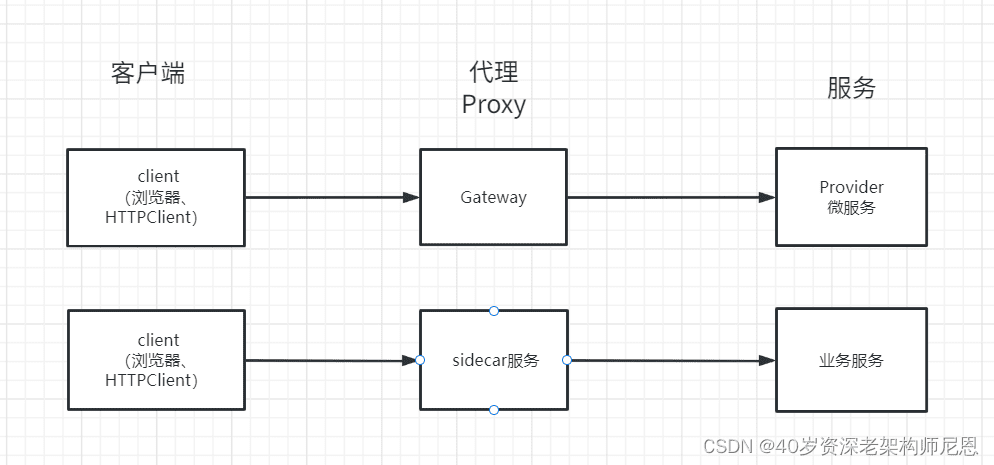
1.1 Sidecar(边车)模式
像摩托车旁的挎斗一样,每个业务 Pod 旁挂一个 Sidecar 代理:
Sidecar 负责:流量代理、监控、日志、限流、熔断、链路追踪等;与业务同生共死(同 Pod 生命周期)。
| 好处 | 代价 |
|---|---|
| 非侵入,多语言统一治理 | 每 Pod 多一个容器,占 CPU/内存 |
| Sidecar 可独立升级 | 多一跳本地转发(同节点延迟极低) |
| 与业务技术栈解耦 | 运维复杂度上升 |
1.2 代理(Proxy)模式
Sidecar 在客户端与服务之间拦截并转发请求,类似 Nginx 反向代理:Client → Envoy → 业务服务 → Envoy → Client。所有东西向流量默认经 Sidecar,才能统一做 mTLS、路由、遥测。
二、Spring Cloud 与 Istio 能力对照
| 能力 | Spring Cloud | Istio |
|---|---|---|
| 服务发现 | Eureka / Nacos | Pilot |
| 负载均衡 | Ribbon | Envoy |
| 熔断限流 | Hystrix / Sentinel | Circuit breaker / Mixer 策略 |
| API 网关 | Zuul / Gateway | Ingress Gateway / Egress |
| 配置 | Config Server | ConfigMap / Galley(配置分发) |
| 灰度 / A/B | 自研或 Gateway | VirtualService + DestinationRule |
| 混沌工程 | Chaos Monkey | Envoy fault injection |
接入 K8s + Istio 后,进程内 SDK 可大幅缩减;服务间通信走 ClusterIP/Sidecar,性能多一次本地转发,同节点通常可忽略,跨节点与原来 Feign 调用量级相当。
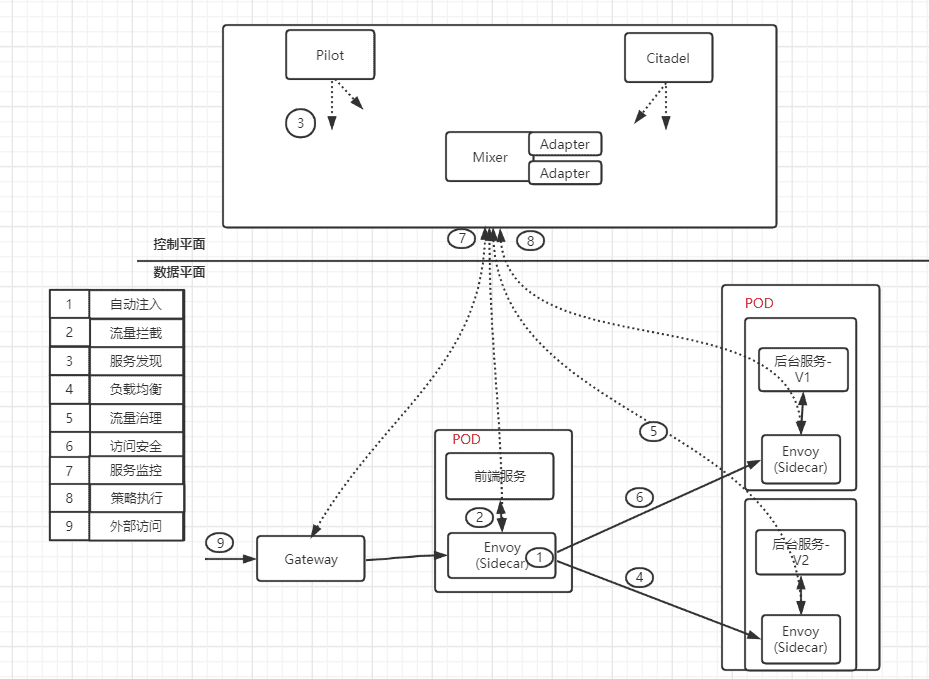
三、Istio 架构:控制面与数据面
| 平面 | 组件 | 职责 |
|---|---|---|
| 数据面 | Envoy(Sidecar / Gateway) | 拦截流量、负载均衡、路由、遥测 |
| 控制面 | Pilot | 服务发现、路由规则下发给 Envoy |
| Citadel | 证书与身份(mTLS) | |
| Galley | 校验并分发 Istio 配置(MCP) | |
| Sidecar Injector | Pod 创建时自动注入 Envoy |
3.1 一次请求在 Istio 里发生什么
- Sidecar 注入:创建 Pod 时 Injector 修改 Spec,增加 Envoy 容器;Init 容器设置 iptables 劫持进出流量。
- 流量拦截:业务无感知,进出流量经本地 Envoy。
- 服务发现:Envoy 从 Pilot 获取目标服务实例列表。
- 负载均衡 / 路由:按 VirtualService 规则选 v1/v2、按权重分流。
- 安全:Citadel 下发证书,Sidecar 间可选 mTLS。
- 遥测:访问指标、日志经 Mixer 适配器到 Prometheus 等(新版本部分能力已合并进 Envoy)。
3.2 核心组件速览
Pilot(必需):对接 K8s API 做服务发现;将 VirtualService、DestinationRule 等转为 Envoy 配置,经 xDS/gRPC 推送。
Envoy(数据面):C++ 实现的高性能代理;Pod 内与 pilot-agent 同镜像运行——agent 负责启动 Envoy、热加载配置。
Ingress Gateway:集群北向入口,本身也是带 Envoy 的 Deployment,从集群外接收流量再转发到网格内服务。
Mixer(旧版常见):策略检查与遥测上报;Istio 1.5+ 后能力逐步下沉,新项目以 Prometheus + Telemetry API 为主。
Sidecar Injector:命名空间标签 istio-injection=enabled 后,新 Pod 自动注入 Sidecar。
四、Minikube 安装 Istio
环境:Minikube + kubectl,Kubernetes ≥ 1.23。以下以 Istio 1.20+ 官方 istioctl 为例(旧版 istio-demo.yaml 流程仍常见,命令类似)。
4.1 下载与 PATH
curl -L https://istio.io/downloadIstio | sh -
cd istio-1.20.0
export PATH=$PWD/bin:$PATH
istioctl version
4.2 安装控制面与 Ingress Gateway
# 默认 profile:含 Pilot、Ingress Gateway、Injector 等
istioctl install --set profile=demo -y

kubectl get pods -n istio-system
kubectl get svc -n istio-system
期望看到 istiod、istio-ingressgateway 等为 Running。
4.3 验证 Sidecar 注入
手动注入(不依赖命名空间标签):
istioctl kube-inject -f first-istio.yaml | kubectl apply -f -
kubectl get pod
# READY 2/2:业务容器 + istio-proxy
kubectl describe pod <pod-name> | grep -A2 Containers自动注入(推荐):
kubectl create namespace my-istio-ns
kubectl label namespace my-istio-ns istio-injection=enabled

kubectl apply -f first-istio.yaml -n my-istio-ns
kubectl get pods -n my-istio-ns
# 应看到 2/2 READY
原理:Injector 在 Pod Spec 中追加 Envoy 容器与 init 容器,并挂载 ConfigMap/Secret。
五、Bookinfo 示例应用
Bookinfo 是 Istio 官方书店 Demo:productpage 调 details、reviews(v1/v2/v3)、ratings,多语言、多版本,适合练流量治理。
5.1 部署
kubectl create namespace bookinfo-ns
kubectl label namespace bookinfo-ns istio-injection=enabled

cd istio-1.20.0/samples/bookinfo/platform/kube
kubectl apply -f bookinfo.yaml -n bookinfo-ns

kubectl get pods -n bookinfo-ns
# 每个 Pod 2/2:应用 + istio-proxy
kubectl get svc -n bookinfo-ns
5.2 集群内验证
kubectl exec -it "$(kubectl get pod -l app=ratings -n bookinfo-ns -o jsonpath='{.items[0].metadata.name}')" \
  -c ratings -n bookinfo-ns -- \
  curl -s productpage:9080/productpage | grep -o "<title.*</title>"
5.3 通过 Ingress 暴露(K8s Ingress 资源)
apiVersion: networking.k8s.io/v1
kind: Ingress
metadata:
  name: productpage-ingress
  namespace: bookinfo-ns
spec:
  rules:
    - host: productpage.example.com
      http:
        paths:
          - path: /
            pathType: Prefix
            backend:
              service:
                name: productpage
                port:
                  number: 9080
kubectl apply -f productpage-ingress.yaml -n bookinfo-ns
minikube ip
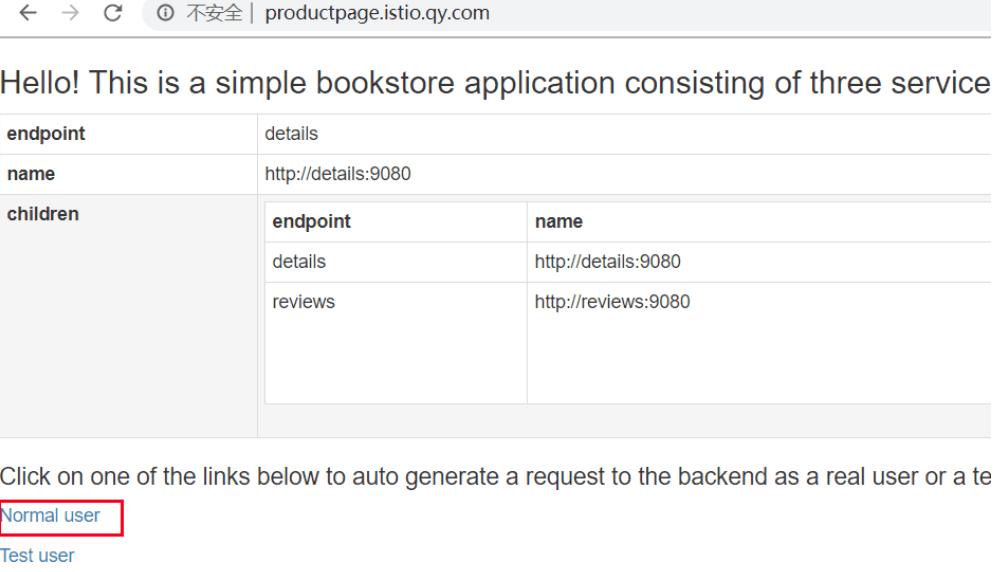
# /etc/hosts: <minikube-ip> productpage.example.com浏览器访问 http://productpage.example.com,多次刷新 reviews 会出现无星 / 黑星 / 红星三个版本(默认随机负载均衡)。
六、通过 Istio Ingress Gateway 访问
网格标准入口是 istio-ingressgateway Service,而不是直接绑业务 Ingress。
6.1 应用 Gateway + VirtualService
cd istio-1.20.0/samples/bookinfo/networking
kubectl apply -f bookinfo-gateway.yaml -n bookinfo-ns
kubectl get gateway -n bookinfo-ns
bookinfo-gateway.yaml 定义 Gateway 监听 80/443,VirtualService 把 /productpage 等路径路由到 productpage Service。
6.2 获取访问地址
export INGRESS_HOST=$(kubectl get po -l istio=ingressgateway -n istio-system \
  -o jsonpath='{.items[0].status.hostIP}')
export INGRESS_PORT=$(kubectl -n istio-system get svc istio-ingressgateway \
  -o jsonpath='{.spec.ports[?(@.name=="http2")].nodePort}')
export GATEWAY_URL=$INGRESS_HOST:$INGRESS_PORT

echo "http://$GATEWAY_URL/productpage"
curl -s "http://$GATEWAY_URL/productpage" | grep -o "<title.*</title>"
Minikube 下 hostIP 常为节点 IP,端口为 NodePort(如 31380)。
6.3 Gateway 与 K8s Ingress 的区别
| 方式 | 说明 |
|---|---|
| K8s Ingress | 需集群内 Ingress Controller;规则在 Ingress 资源 |
| Istio Gateway | Envoy 实现的 L4/L7 入口;与 VirtualService 配合,统一在网格内做路由、TLS、灰度 |
生产环境通常:Gateway 作唯一北向入口,集群内东西向走 Sidecar。
七、Sidecar 注入与流量治理延伸
自动注入后,可通过 VirtualService 把 90% 流量打到 reviews-v1、10% 到 v2(与上一篇金丝雀呼应):
apiVersion: networking.istio.io/v1beta1
kind: VirtualService
metadata:
  name: reviews
  namespace: bookinfo-ns
spec:
  hosts:
    - reviews
  http:
    - route:
        - destination:
            host: reviews
            subset: v1
          weight: 90
        - destination:
            host: reviews
            subset: v2
          weight: 10
需配合 DestinationRule 定义 subset: v1/v2 与版本标签。
八、清理
kubectl delete namespace bookinfo-ns
# 卸载 Istio
istioctl uninstall --purge -y
kubectl delete namespace istio-system
小结
- Service Mesh = Sidecar 模式 + 统一控制面;Istio 的数据面是 Envoy,控制面核心是 Pilot + Injector。
- Bookinfo 验证多服务调用链;Ingress Gateway 是集群外访问网格的推荐入口。
- 精确灰度、A/B、mTLS 在 Istio 里用 VirtualService / DestinationRule 声明即可,无需改 Java 代码。