
Elasticsearch 高可用集群架构
2026/10/27大约 3 分钟
Elasticsearch 系列 · 第 8/10 篇
上一篇:《深度分页问题与自定义分词》
下一篇预告:《ES 集群生产实践与性能调优》
开头:场景与目标
单机 ES 扛不住流量和数据量。本篇搭建三节点集群,理解主分片/副本、集群状态红黄绿,并完成 ES 8.x Security 认证与 Kibana/Cerebro 接入。
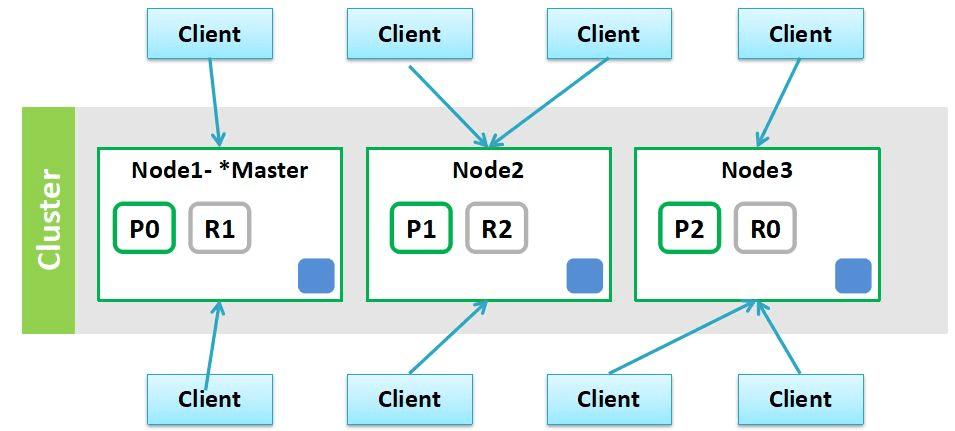
一、为什么需要集群
| 能力 | 说明 |
|---|---|
| 高可用 | 部分节点宕机,服务与数据仍可用 |
| 水平扩展 | 加节点扩容存储与吞吐 |
| 负载分散 | 分片分布在多节点,并行检索 |
二、核心概念
2.1 集群与节点
- Cluster:一个 ES 集群由多个节点组成,通过
cluster.name区分 - Node:一个 ES 进程实例;生产建议一机一节点
2.2 分片
PUT /blogs
{
  "settings": {
    "number_of_shards": 3,
    "number_of_replicas": 1
  }
}| 类型 | 作用 | 可调 |
|---|---|---|
| Primary Shard | 水平切分数据,底层是 Lucene 实例 | 创建后不可改 |
| Replica Shard | 主分片副本,保证高可用、提升读吞吐 | 可动态调整 |
3 主分片 + 1 副本 = 共 6 个分片(每主 1 副)。
2.3 集群健康状态
| 状态 | 含义 |
|---|---|
| Green | 所有主分片与副本正常 |
| Yellow | 主分片正常,部分副本未分配 |
| Red | 有主分片未分配,部分数据不可用 |
三、CAT API 运维
GET /_cluster/health
GET /_cat/nodes?v
GET /_cat/health?v
GET /_cat/shards?v
GET /_cat/master?v
GET /_cat/indices?v
四、三节点集群搭建
4.1 环境准备
| IP | 节点名 |
|---|---|
| 192.168.65.213 | node-1 |
| 192.168.65.207 | node-2 |
| 192.168.65.208 | node-3 |
adduser es
vim /etc/hosts
192.168.65.213 es-node1
192.168.65.207 es-node2
192.168.65.208 es-node3

systemctl stop firewalld
systemctl disable firewalld
4.2 系统调优(bootstrap checks)
# /etc/security/limits.conf
* soft nofile 65536
* hard nofile 65536
* soft nproc 4096
* hard nproc 4096

# /etc/sysctl.conf
vm.max_map_count=262144
sysctl -p
4.3 elasticsearch.yml(三节点示例)
node-1:
cluster.name: es-cluster
node.name: node-1
network.host: 0.0.0.0
discovery.seed_hosts: ["es-node1", "es-node2", "es-node3"]
cluster.initial_master_nodes: ["node-1", "node-2", "node-3"]
http.cors.enabled: true
http.cors.allow-origin: "*"
xpack.security.enabled: false
node-2 / node-3 仅改 node.name。集群首次启动后,应从所有节点配置中移除 cluster.initial_master_nodes。
4.4 启动与验证
bin/elasticsearch -d
GET /_cluster/health?pretty
GET /_cat/nodes?v
五、ES 8.x Security 认证
生产环境应开启 Security:
xpack.security.enabled: true
xpack.security.enrollment.enabled: true
首次启动会输出 enrollment token,用于 Kibana 接入:
bin/elasticsearch-create-enrollment-token -s kibana
bin/elasticsearch-reset-password -u elastic
Kibana kibana.yml:
elasticsearch.hosts: ["https://localhost:9200"]
elasticsearch.username: "kibana_system"
elasticsearch.password: "<password>"
elasticsearch.ssl.verificationMode: certificate
REST 请求需带认证:
curl -u elastic:password -k https://localhost:9200/_cluster/health六、Cerebro 集群管理
Cerebro 是轻量 Web 集群管理工具,可查看节点、索引、分片分布,执行常见运维操作。配置 ES 地址与认证后即可使用。
小结
- 主分片数创建时定死;副本数可随时调。
- Yellow 通常是副本未分配(单节点集群设
number_of_replicas: 0)。 - 生产必须做 limits/sysctl 调优 + Security 认证。
下一篇:《ES 集群生产实践与性能调优》